Habit Tracking Apps with Friends: A Comparison Guide
Compare habit tracking apps you can use with friends: group sizes, prices, and social accountability features. Free and paid options reviewed.
The best habit tracker apps to use with friends are HabitShare (free; choose which friends see each habit), Habitica (a role-playing game where your party shares quests), Streaks (share tasks with other Streaks users on iPhone), and Cohorty (do the habit at the same time in a shared session, no camera). Which one fits depends on whether you want friends to see your progress or to do the habit alongside you.
Habit tracking alone is easy to abandon after a few missed days. When friends can see your check-ins, or when you meet at the same time to do the habit, quitting quietly gets harder. Research on goal pursuit supports the idea: monitoring progress helps, especially when progress is reported or recorded. See also why group habits work.
Below are 7 apps with friend or group features, compared on how sharing works, price, and platforms. We compared them from their public product information; check current app-store listings before you pay.
Disclosure: Cohorty publishes this journal, so we have a commercial interest in one option.
Quick Comparison Table
| App | Best For | Price | Group Size | Platform |
|---|---|---|---|---|
| HabitShare | Sharing selected habits with friends | Free to start | Any number of friends | iOS, Android |
| Habitica | Gamification lovers | Free/$5/mo | 4-30 | Web, iOS, Android |
| Streaks | Apple users | $6.99 | 2-8 | iOS, Apple Watch |
| Cohorty (our product) | Doing habits at the same time | Free; Plus $3/mo | Everyone who books the time | Web (desktop and phone) |
| Strides | Data nerds | Free/$5/mo | 2-10 | iOS |
| Done | Simple tracking | Free/$5/mo | 2-∞ | iOS, Android |
| Productive | Premium experience | Free/$8/mo | 2-15 | iOS, Android |
Quick pick: to let friends see your progress, start with HabitShare; to do the habit together at the same time, try a Cohorty session.
Now let’s dive into each app.
1. HabitShare — Best for Sharing Specific Habits with Friends
Price: Free to start (some features may be paid; check the app listing) Platforms: iOS, Android Best for: Friends or couples who want to see each other’s progress
What Makes It Special
HabitShare is built around sharing: you choose which friends can see each habit, so you can share workouts with a gym friend and keep other habits private. Friends see your progress and can send quick encouragement.
Key Features
✅ Per-habit privacy (share with one friend, a group, or no one) ✅ Reminders and flexible schedules ✅ Streaks and charts ✅ Messages and quick reactions between friends
Pros
- Social sharing is the core feature, not an add-on
- Fine-grained privacy control
- Free to start
Cons
- Friends need to install the app too
- Development activity appears slow; check recent updates before relying on it
2. Habitica — Best for Gamification
Price: Free (optional subscription $4.99/mo)
Platforms: Web, iOS, Android
Best for: RPG fans who want to “level up” by completing habits
What Makes It Special
Habitica turns your life into a role-playing game. Complete habits to:
- Earn gold and experience points
- Unlock armor and pets
- Battle monsters with your party
You can join or create parties (groups of 4-30 players) where everyone’s health is shared. If you break your habits, your party takes damage.
Key Features
✅ Full RPG system with avatars, quests, guilds
✅ Party challenges (co-op gameplay)
✅ Massive community (millions of users)
✅ Highly customizable habit types
Pros
- Incredibly motivating for gamers
- Huge community with tons of guilds
- Social pressure works well in parties
- Free with optional premium
Cons
- Overwhelming interface for non-gamers
- Requires explaining the system to new users
- Too complex if you just want simple tracking
Best for: Gamers who want habit tracking to feel like an MMO.
3. Streaks — Best for Apple Users
Price: $6.99 (one-time)
Platforms: iOS, Apple Watch, iPad
Best for: Apple ecosystem users who want elegant design
What Makes It Special
Streaks is beautifully designed for iOS and integrates deeply with Apple Health and Apple Watch.
The social feature is Streak Sharing—you can share specific habits with friends/family who also use the app. They see your current streak and can send encouragement.
Key Features
✅ Max 12 habits (forces prioritization)
✅ Apple Health integration
✅ Apple Watch complications
✅ Widget support
✅ Private habit sharing with specific people
Pros
- Gorgeous, native iOS design
- One-time payment (no subscription)
- Perfect Apple Watch integration
- Focuses you on your top habits
Cons
- iOS only (no Android)
- Limited to 12 habits total
- No public groups/challenges
- Sharing is 1:1, not groups
Best for: iPhone users who want minimal, beautiful tracking with close friends.
4. Cohorty — Best for Doing Habits at the Same Time
Disclosure: Cohorty publishes this journal, so we have a commercial interest in it.
What it is: You book a 30-minute session at one of a few fixed times each day and do your habit alongside everyone who booked the same time, in one shared room. You write one line about what you will do, do it, and leave one line about how it went. No video, no chat; everyone uses a nickname.
Why it fits friends:
- Friends can book the same time and meet in one room, with no group chat to manage
- Other people doing their own habit fill the room, so the session still works if a friend cancels
- No camera, so nobody has to tidy up or be “on”
Limitations:
- Sessions run at a few set times each day unless you open your own with Plus
- The community is still small, so some times have few people (you can still start on your own)
- It is built around sessions, not detailed logging: pair it with a tracker if you want charts of weight, pages, or reps
- Runs in the browser on desktop and phone
Pricing: Joining sessions is free. Plus is $3/month and lets you open your own times at any half hour and repeat bookings on the days you choose.
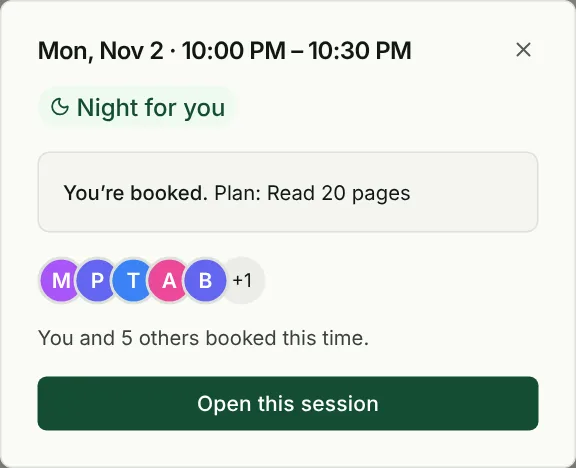
Best for: Friends who want to do a habit at the same time without coordinating video calls.
5. Strides — Best for Data & Flexibility
Price: Free (Pro at $4.99/mo)
Platforms: iOS
Best for: People who want detailed tracking and custom goals
What Makes It Special
Strides supports 4 types of tracking:
- Target (complete X times)
- Average (maintain an average)
- Milestone (project goals)
- Habit (yes/no daily)
You can share habits with friends and see their progress charts.
Key Features
✅ 4 tracking types for different goal styles
✅ Detailed charts and analytics
✅ Friend sharing with progress graphs
✅ Unlimited habits (Pro)
Pros
- Most flexible tracker for different goal types
- Great data visualization
- Share detailed progress (not just streaks)
Cons
- iOS only
- Free plan limited to 5 habits
- UI can feel cluttered
- No group challenges, just 1:1 sharing
Best for: Data-driven people who want deep analytics and custom tracking.
6. Done — Best for Simplicity
Price: Free (Premium $4.99/mo)
Platforms: iOS, Android
Best for: People who want dead-simple tracking with optional sharing
What Makes It Special
Done is beautifully minimal. You create habits, check them off, and see your streak.
The social feature is Groups—invite friends/family to a shared space where everyone’s habits are visible. It’s like a family accountability dashboard.
Key Features
✅ Unlimited habits (Premium)
✅ Custom repeating schedules
✅ Groups with shared visibility
✅ Motivational quotes
✅ Widgets and Apple Watch support
Pros
- Super simple interface
- Works on iOS and Android
- Groups are easy to set up
- Free plan is generous
Cons
- No challenges or structured programs
- Groups require you to invite people manually
- Limited customization
- Premium needed for unlimited habits
Best for: Families or friend groups who want a simple shared tracker.
7. Productive — Best for Premium Experience
Price: Free (Premium $7.99/mo)
Platforms: iOS, Android
Best for: People who want a polished, motivational app
What Makes It Special
Productive has a gorgeous, motivating interface with smooth animations and encouraging messages.
The social feature is Challenges—you can create custom challenges and invite friends. Everyone tracks their version of the habit and compares completion rates.
Key Features
✅ Beautiful, motivational UI
✅ Custom challenges with friends
✅ Smart reminders based on your routine
✅ Progress insights and trends
✅ Premium has advanced stats
Pros
- Most polished interface
- Motivational messages and celebrations
- Works on iOS and Android
- Great for beginners
Cons
- Premium is pricey ($7.99/mo)
- Free plan limited to 3 habits
- No large group features
- Challenges are manual setup
Best for: People who want a premium, motivational tracking experience.
How to Choose the Right App
Choose Cohorty if:
- You want a fixed time to do the habit, not just a shared checklist
- Your friends are not always available, and you are happy to work alongside strangers
- You want no camera and no chat
Choose Habitica if:
- You love RPGs and gamification
- You want large community guilds
- You’re motivated by quests and rewards
Choose Streaks if:
- You’re an Apple user who wants elegant design
- You prefer 1:1 sharing with close friends
- You want deep Apple Watch integration
Choose Strides if:
- You need flexible tracking (not just yes/no habits)
- You love detailed analytics and charts
- You’re tracking complex goals (averages, milestones)
Choose Done if:
- You want simple, no-frills tracking
- You’re creating a family/friend group tracker
- You need cross-platform (iOS + Android)
Choose HabitShare if:
- You want friends to see specific habits
- You need privacy control per habit
- You want a free, simple social tracker
Choose Productive if:
- You want a beautiful, motivational interface
- You’re willing to pay for premium
- You need smart scheduling
How to Do a Habit With Friends, Step by Step
Most friend groups fade because the setup is vague: who checks in, when, and what counts. Pick one of two setups and agree on it in a single message.
Setup A: share progress (HabitShare, Streaks, Habitica)
- Everyone installs the same app and adds one shared habit.
- Agree on what counts (“20 minutes of reading”, not “read more”).
- Agree on a check-in deadline, for example “mark it done by 10 PM”.
- Once a week, one person posts a short summary in your group chat.
Setup B: do it at the same time (Cohorty)
- Pick one time that works for everyone, for example the daily 10 PM session.
- Each person books it and writes their own plan; you don’t need the same habit.
- Enter the room when it opens, work for up to 30 minutes, tap Done.
- After the session, tap “Same time tomorrow” so the next one is already booked.
With Setup B nobody has to chase anyone: if a friend misses a day, the session still runs with whoever else booked. If your group needs a time that isn’t one of the daily ones, Cohorty Plus lets one person open it and repeat it weekly; everyone else can still join for free.
Pro Tips for Tracking with Friends
1. Set Clear Expectations
Before starting, agree on:
- How often you’ll check in (daily? weekly?)
- Whether progress is public or private
- What happens if someone falls behind
2. Start Small
Don’t try to track 20 habits with 10 friends. Start with 1 habit, 2-5 people, 30 days.
3. Use Built-In Features (Don’t DIY)
Don’t try to manually text each other every day. Use the app’s built-in check-ins—that’s what they’re for.
4. Celebrate Wins
When someone hits a milestone, celebrate it! Positive reinforcement is more powerful than accountability alone.
5. Be Forgiving
Life happens. If someone misses a day, don’t make them feel guilty. Encourage them to get back on track.
Detailed Comparison: Which App Wins?
Our pick for doing habits at the same time: Cohorty
Disclosure: Cohorty publishes this journal, so we have a commercial interest in it.
If the problem is not recording the habit but actually starting it, a booked 30-minute session with other people in the room is the most direct fix. If you mainly want to share checklists with friends, choose one of the tracker-style apps above.
🥈 Runner-Up: Habitica
Rating: 4.5/5
- ✅ Most engaging (RPG mechanics)
- ✅ Huge community
- ✅ Free with optional premium
- ⚠️ Complex for beginners
- ⚠️ Overwhelming interface
🥉 Best Premium Option: Streaks
Rating: 4.8/5
- ✅ Beautiful iOS design
- ✅ One-time payment (no subscription)
- ✅ Perfect Apple Watch integration
- ⚠️ iOS only
- ⚠️ Limited to 12 habits
The Bottom Line
Best for sharing progress with friends: HabitShare
Best for doing habits at the same time: Cohorty
Best for gamers: Habitica
Best for Apple users: Streaks
Best for data nerds: Strides
Best for simplicity: Done
The “best” app depends on your personality:
- Social butterflies → Habitica or HabitShare
- Minimalists → Streaks or Done
- Data lovers → Strides
- Privacy-minded sharers → HabitShare (per-habit sharing)
The most important thing? Pick one and commit. Switching apps every week is a form of procrastination. For comprehensive app reviews, check our habit tracker comparison guide.
For setting up the group itself (who joins, how often to check in, what to do when someone drops out), see our guide to friend accountability apps.
Frequently Asked Questions (FAQs)
What is the best free habit tracker with friends?
HabitShare is the simplest free option built specifically for sharing habits with friends. Habitica is free for gamers who enjoy party quests. If you want to do the habit together rather than just share check-ins, Cohorty sessions are free to join.
Can you track habits with friends on iPhone?
Yes! The best options for iPhone users are:
- Streaks ($6.99 one-time) - Native iOS design with Apple Watch integration
- Done (Free/Premium) - Works on both iOS and Android
- Productive (Free/Premium) - Beautiful interface with custom challenges
- Cohorty (Free) - Web-based, works on any iPhone browser
How does social accountability improve habit success?
When others can see your progress, quitting quietly becomes harder, and a regular check-in prompts you to act. A meta-analysis of progress monitoring found that monitoring helps on average, with larger effects when progress is reported or recorded. No single percentage applies to everyone.
Which habit app is best for couples?
Done and Streaks are ideal for couples because they support 1:1 habit sharing with simple, private progress visibility. HabitShare lets each partner choose exactly which habits to share. Cohorty works if you want to do a habit at the same time, even from different places.
Are group habit trackers better than solo apps?
For most people, yes. Group trackers provide:
- External accountability (not just self-discipline)
- Motivation from peers when you feel like quitting
- Social proof that the habit is achievable
- Celebration of wins with others
However, introverts or privacy-focused individuals may prefer solo tracking with an app like Loop or Streaks. If social pressure feels overwhelming, see habit apps for introverts.
What’s the difference between Cohorty and Habitica?
Habitica turns tasks into a role-playing game with parties and quests. Cohorty has no game layer: you book a 30-minute session and do your habit at the same time as other people, with no camera or chat.
Do I need to invite friends to use these apps?
Not necessarily. Habitica lets you join parties and guilds with strangers, and in Cohorty sessions you work alongside whoever booked the same time. Communities such as r/GetMotivatedBuddies also help you find a partner online.
Your Next Step
- Pick one app from the list above
- Invite 2-3 friends (or book a Cohorty session with people already showing up)
- Choose 1 habit to track for 30 days
- Set a daily check-in time
- Start today (not Monday)
Social accountability is the missing ingredient in most people’s habit-building journey. Don’t do it alone.
Want to skip the friend-recruiting hassle? Book a free Cohorty session and do your habit at the same time as other people. No camera, no chat.