
Cohorty Plus: Open Your Own Times and Repeat Bookings
How Cohorty Plus works: open a session at any half hour, repeat it on the days you choose, and let others join you. Setup steps, limits and pricing.
Cohorty’s free plan gives you a few shared session times every day. That works well if one of them fits your life. Plus is for when it doesn’t: when the only half hour you can protect is 6:30 before work, or 1:00 in your lunch break, or 9:30 after the kids are asleep.
With Plus you can open a session at any half hour and repeat a booking on the days you choose, so the time books itself and you just show up. This guide shows both features step by step, what changes for the people who join you, and the limits worth knowing before you pay.
Disclosure: Cohorty publishes this journal and sells Plus. Price and features as of October 2026. Screenshots use sample data.
What Plus adds
| Free | Plus ($3/month) | |
|---|---|---|
| Join the daily session times | ✓ | ✓ |
| Join times other members opened | ✓ | ✓ |
| Notes, applause and Done | ✓ | ✓ |
| Habits and your private page | ✓ | ✓ |
| Open your own times, at any half hour | ✓ (up to 3 at once) | |
| Repeat a booking on chosen weekdays | ✓ |
Everything that happens inside a session is the same on both plans. Plus is only about when your sessions happen. If you’re still deciding, Free vs Plus walks through who needs which.
Why your own time matters for a habit
A habit attaches to a cue, and a time of day is one of the most reliable cues there is. “Write after my morning coffee, at 6:30” is easier to keep than “write sometime today”, for the same reason that habit stacking and if-then plans work: the decision is made in advance.
The daily times are fixed so that people meet. But if those times fall during your commute or your dinner, the cue never forms. Plus lets you put the session where the habit actually fits, then repeat it so the cue is the same every day.
How to open your own time
- Go to the calendar and tap an empty spot at the half hour you want.
- The dialog says “No one has opened this time yet. Open it and anyone can join you.”
- Pick your habit (or type a plan) and tap Open this time.
On the free plan, tapping an empty spot shows what Plus would add instead of a booking button:
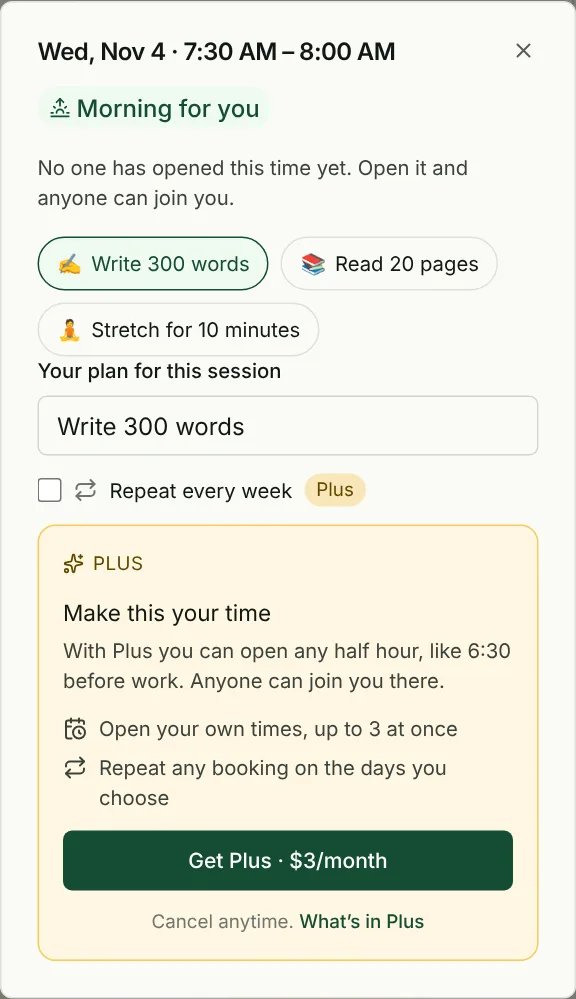
You can open times up to 14 days ahead.
How to repeat a booking every week
- Tap any time on the calendar: a daily time, a time someone opened, or an empty spot.
- Tick Repeat every week.
- Choose the days. Tap the letters to add or remove days; Monday to Friday reads as “weekdays”.
- Tap Book on weekdays at 12:00 PM (the button names your days and time).
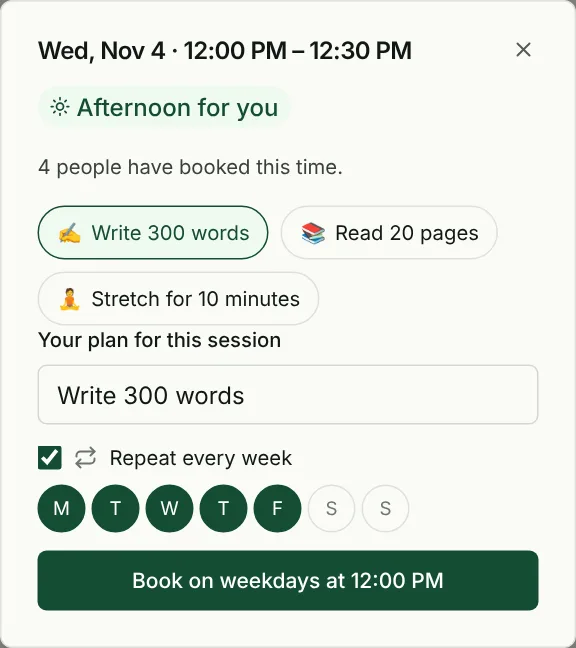
From then on, Cohorty books those days for you, 14 days ahead. Each booked session gets the same plan.
Repeating bookings show on the calendar with a loop icon, and they are listed under the calendar with a Stop button:
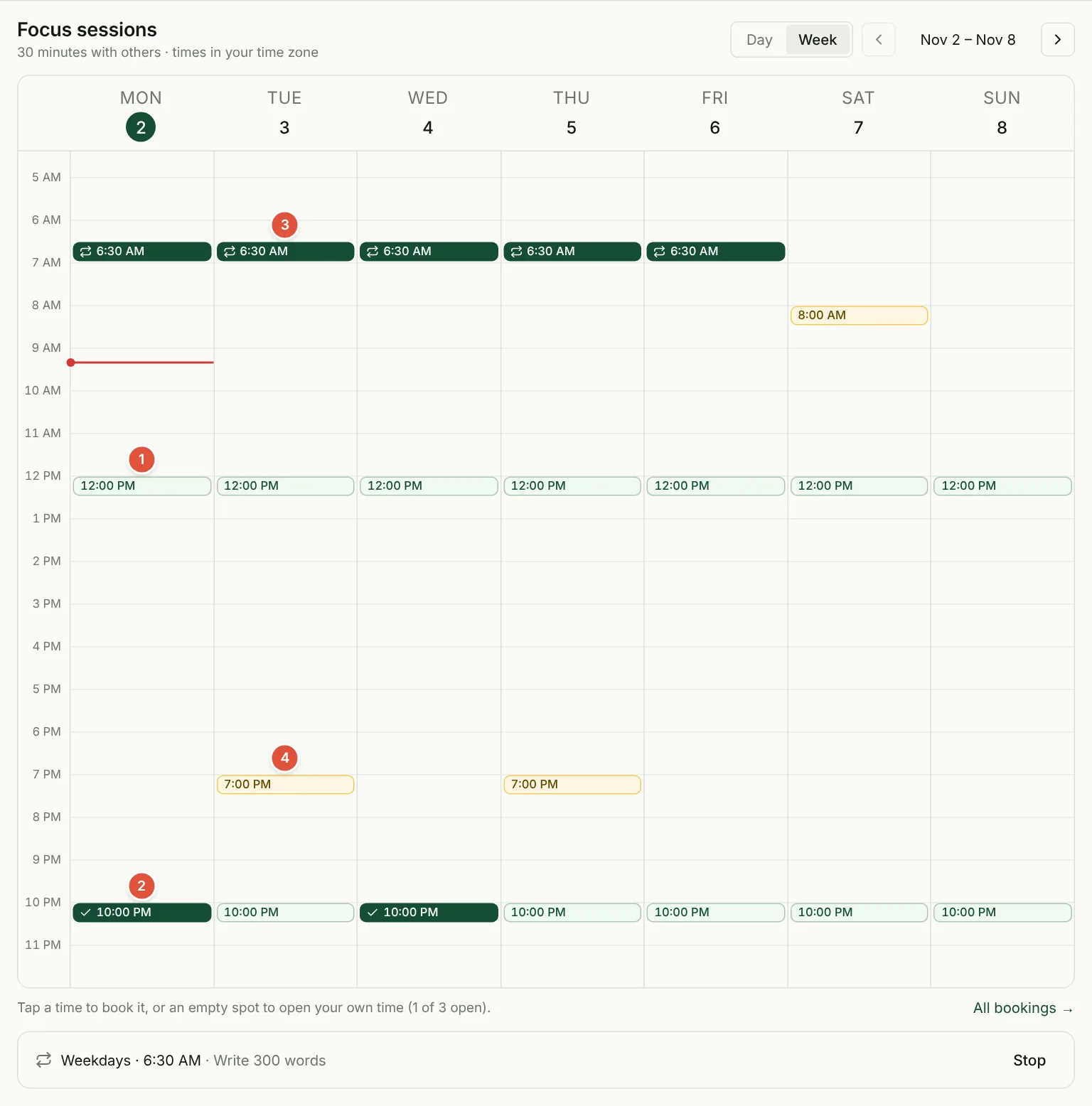
The numbers in the screenshot:
- A daily session time, open to everyone.
- A single booking (check mark).
- A repeating booking (loop icon), here 6:30 AM on weekdays.
- A time another member opened. It’s gold on everyone’s calendar.
What other people see when you open a time
A time you open is not private. It appears in gold on everyone’s calendar, and anyone, free or Plus, can book it and join you. That’s the point: you get a time that fits your day, and other people with the same constraint get a session they couldn’t have had otherwise.
If no one else books it, you can still start on your own. Early mornings and late evenings are quieter than the daily times, so expect some solo sessions at unusual hours. Your plan, notes and Done work exactly the same.
Limits worth knowing
- Up to 3 open times at once. A repeating booking uses one. The calendar footer shows how many you are using, for example “1 of 3 open”.
- 14 days ahead. You can open times and repeats book sessions up to two weeks out.
- 30-minute sessions. Every session is 30 minutes, on Free and Plus.
- Repeats are weekly by weekday, in your time zone.
If you hit the limit, stop a repeating booking or cancel a time you opened to free a slot.
Price, billing and cancelling
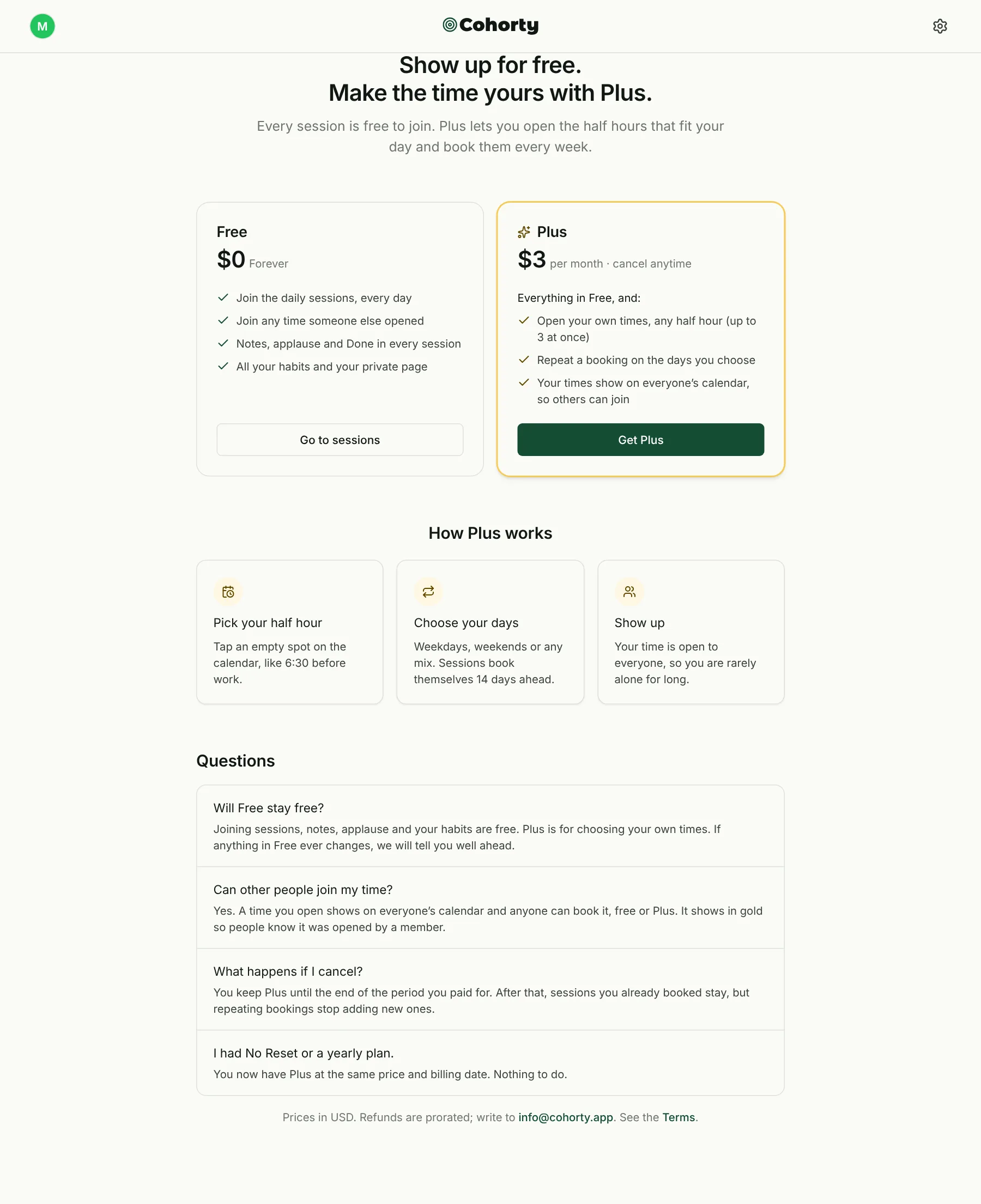
- $3 per month, billed monthly. Cancel anytime from Settings.
- When you cancel, you keep Plus until the end of the period you paid for. Sessions you already booked stay; repeating bookings stop adding new ones.
- Refunds are prorated. Write to [email protected].
- Earlier plans: if you had No Reset or a yearly plan, you now have Plus at the same price and billing date.
Current prices are on the Cohorty pricing page.
Three ways members use Plus
- The before-work block. 6:30 AM on weekdays, “Write 300 words”. The session happens before the day can get in the way.
- The lunch-break study. 12:30 on weekdays, “Spanish flashcards”. Half an hour that would otherwise go to scrolling.
- The weekend long-form. 8:00 AM on Saturdays, “Draft one blog section”, for the habit that needs a calmer morning.
The pattern is the same each time: one habit, one time, the same days every week. If your habit keeps slipping despite a good time slot, read how to stay consistent for the other half of the problem.
Common questions
Can free users join a time I open?
Yes. Times you open are on everyone’s calendar, and any member can book them.
Do I need Plus to book the daily times every day?
No. Joining the daily times, every day, is free. Plus is only needed to open new times or to repeat a booking automatically.
Can I repeat a booking at one of the daily times?
Yes. Ticking Repeat every week works on any time, including the daily ones.
What happens to my repeating bookings if I cancel Plus?
Sessions already booked stay on your calendar. After your paid period ends, the repeat stops booking new ones.