How Cohorty Focus Sessions Work, Minute by Minute
What happens before, during and after a 30-minute Cohorty session: entering the room, one-line notes, applause, Done, and Finished or Showed up.
A Cohorty session is 30 minutes at a set time, shared with everyone who booked that time. There is no video, no audio and no chat. What you get instead is a small amount of structure: a plan you state before you start, a room that shows who else is working, and a single tap to say you finished.
This page explains each part of a session in the order you meet it, with screenshots from a sample 10 PM session. If you haven’t booked yet, start with how to use Cohorty.
Disclosure: Cohorty publishes this journal. The people in the screenshots are fictional sample data.
Before the start: who’s coming
Every session time has its own page, and only the people who booked that time can open it. Before the start, the page lists everyone who booked and what each person plans to do.
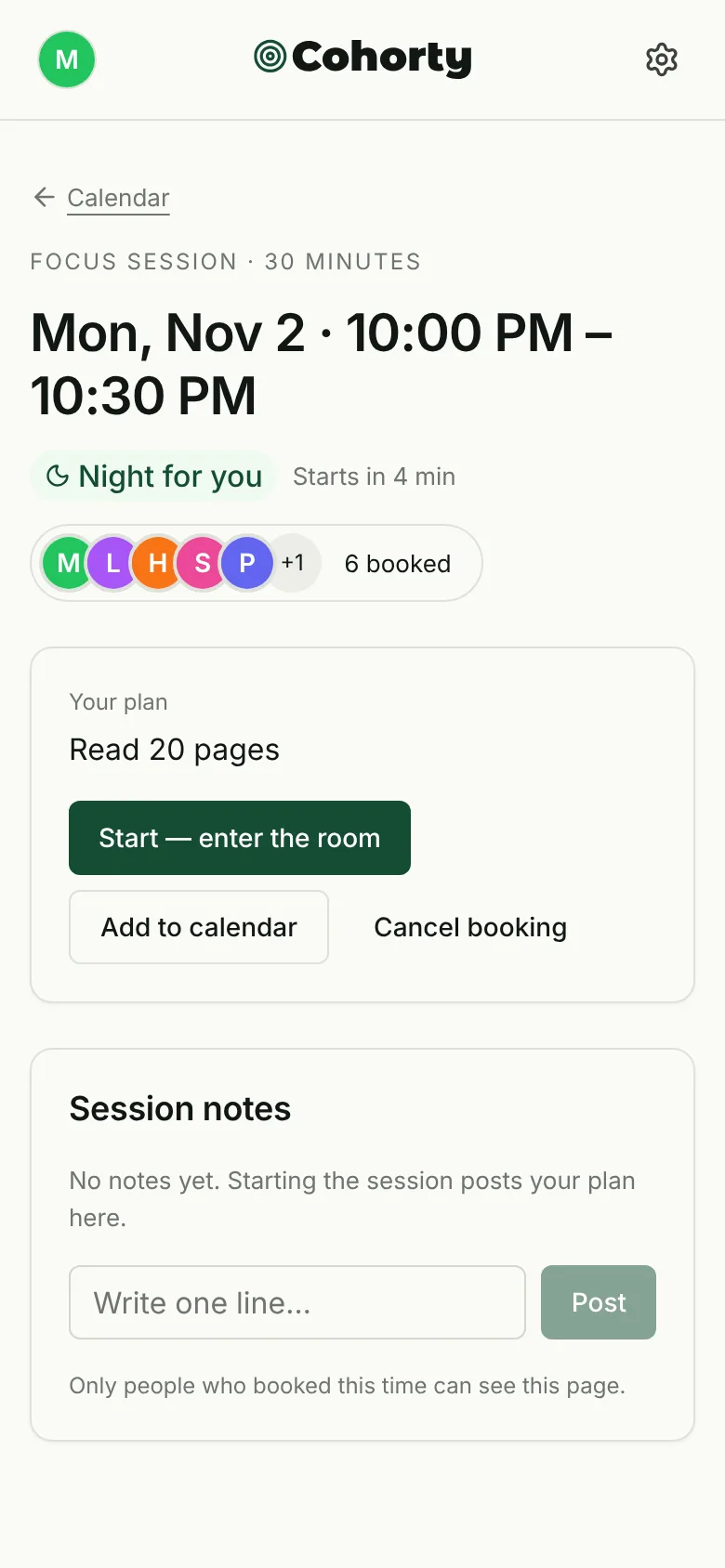
A few details worth knowing:
- Entry opens 5 minutes before the start and stays open until 5 minutes before the end.
- Add to calendar downloads an event for your calendar app. It is a one-time copy, so cancelling in Cohorty does not remove it.
- Cancel booking is available until the session starts.
There is no cap on the room. Everyone who booked the same time shares one room, whether that is two people or twenty.
The start: entering the room
Pressing Start, enter the room is your start report. Your plan is posted as the first line in the session notes (“Started · Read 20 pages”), so the room knows what you are doing without you typing anything.
Stating the task before you begin is the useful part. It turns a vague intention into a small public commitment, the same mechanism behind accountability partners, but without a call to schedule or a person to report back to.
During: the room at a glance
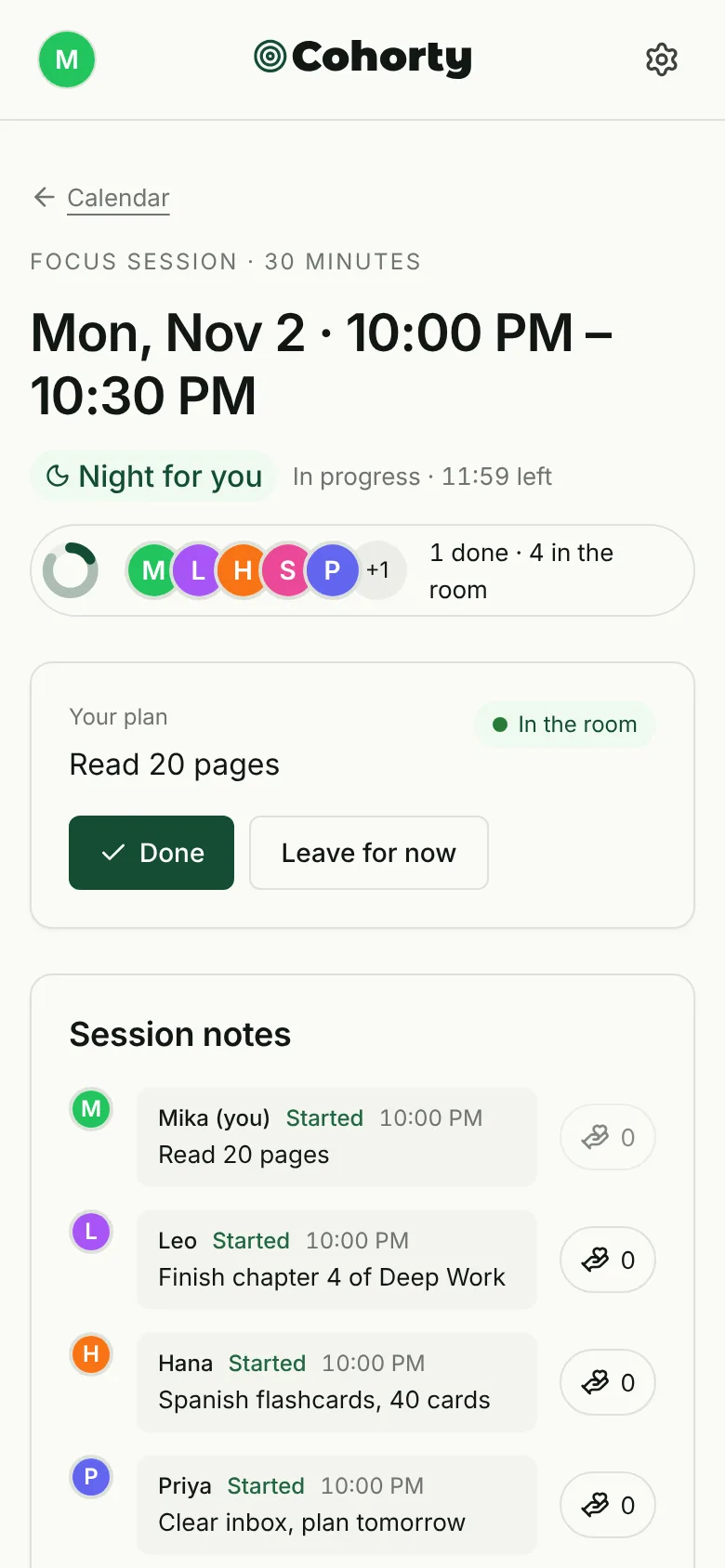
The top of the page shows the time left and a ring:
- Solid part of the ring: people who have finished.
- Light part: people in the room who are still working.
Tap the row of faces to see everyone, grouped by whether they are done. Your own card shows your plan, an “In the room” badge, and two buttons: Done and Leave for now.
One-line notes and applause
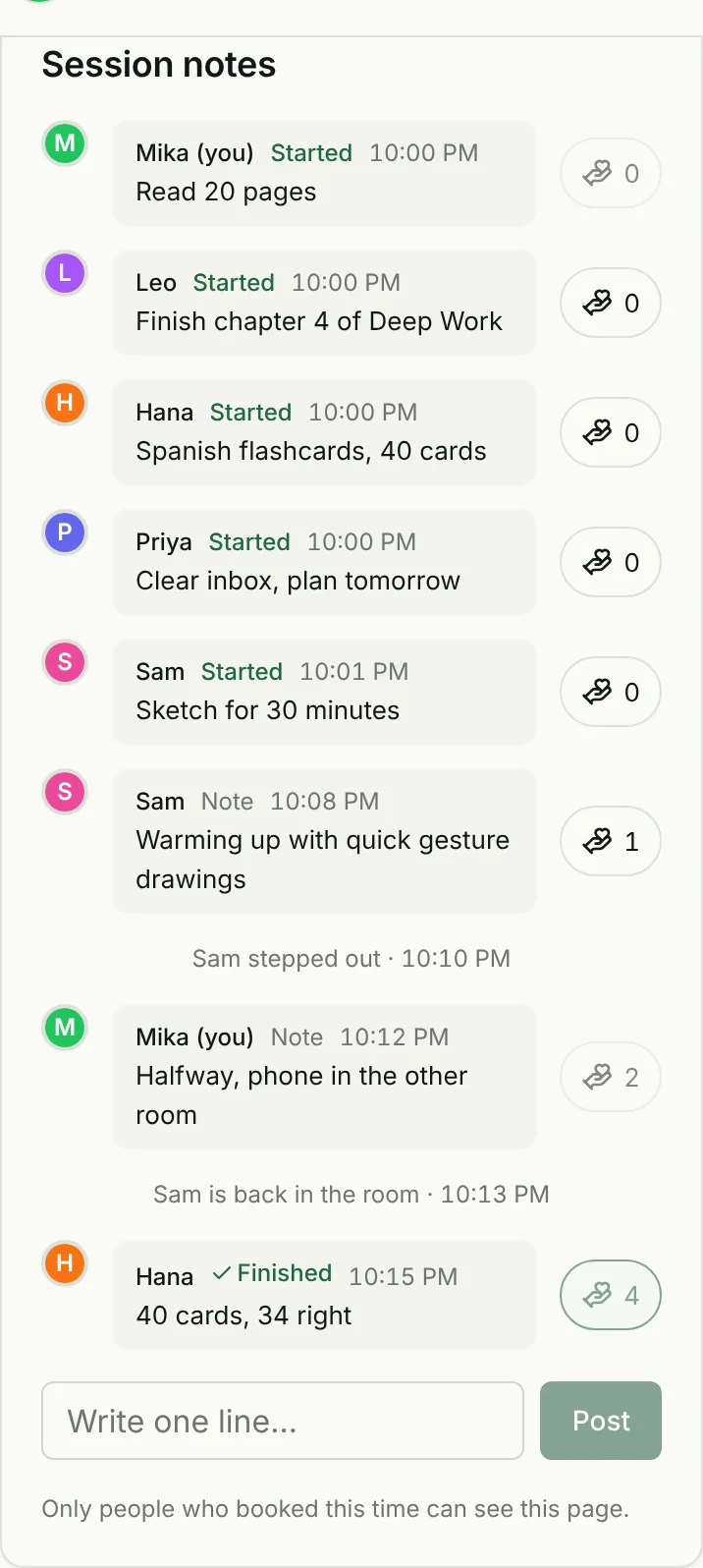
The notes are the only place people “talk”, and they are deliberately small:
- One line, up to 100 characters. Enough for “Halfway, phone in the other room”, not enough for a conversation.
- Applause instead of replies. The hand-heart button applauds a note with one tap. You can’t reply, and there are no likes on profiles or follower counts.
- A quiet room log. If someone leaves and comes back, a grey line records it (“Sam stepped out · 10:10 PM”). It’s information, not a judgment.
Notes from others appear within a few seconds while the page is open, so you can glance at the room without refreshing.
Stepping out
Need to answer the door? Tap Leave for now. You can re-enter while entry is open, and the session still ends at its original time. Leaving is not cancelling: you still count as having shown up.
Finishing: one tap on Done
When you finish, tap Done. Your plan becomes your finishing line, and the note field invites an optional sentence about how it went (“22 pages, finished the chapter”). Other people in the room see your Finished line and can applaud it.
Done is about the plan you wrote, not the clock. If you finish in 20 minutes, tap Done at 20 minutes. If the session ends before you do, that’s fine too.
After the end: Finished, Showed up, Didn’t make it
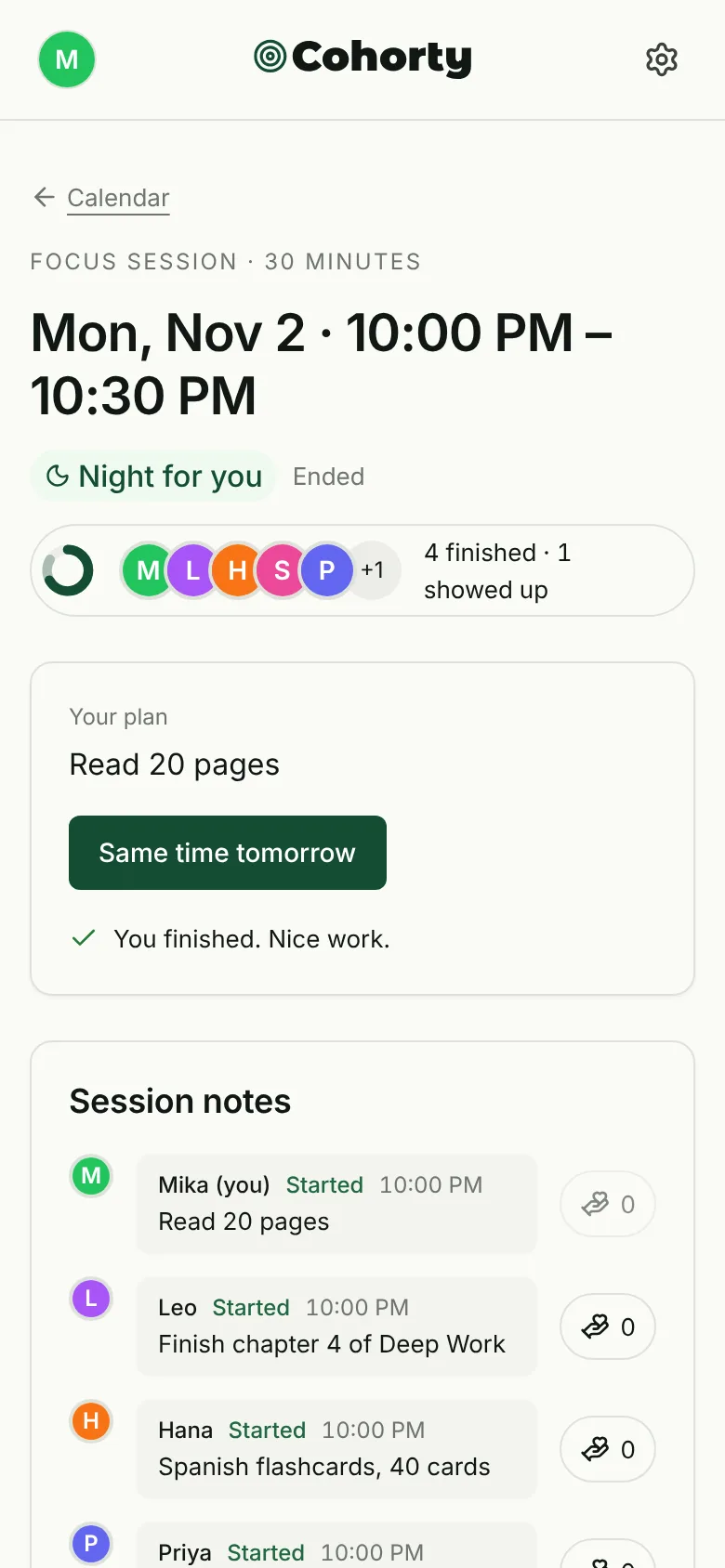
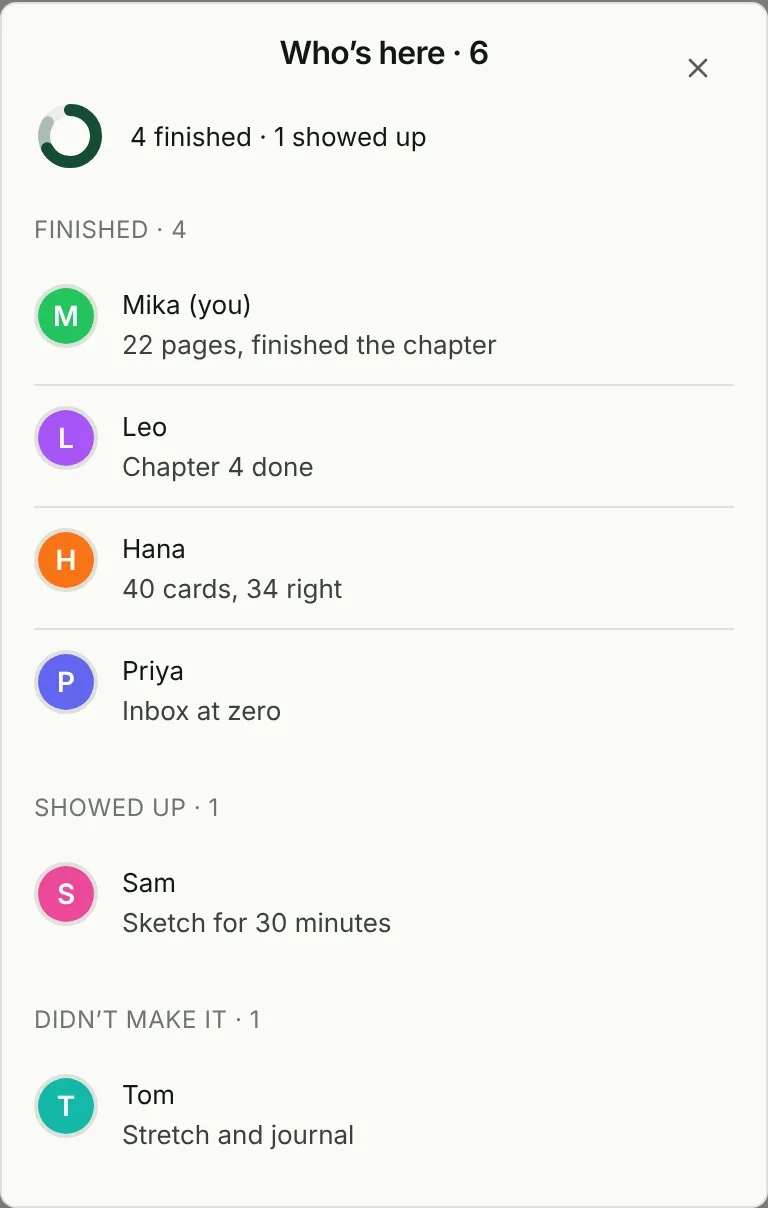
When the session ends, the room is sorted into three groups:
| Group | Meaning |
|---|---|
| Finished | Entered and tapped Done |
| Showed up | Entered the room but didn’t tap Done |
| Didn’t make it | Booked but never entered |
“Showed up” is its own group on purpose. Habits are built by repetition, and on a bad day the repetition is the point: you kept the appointment even if you didn’t finish. If you did finish but forgot to tap Done, the page asks “Did you finish what you planned?” and lets you Mark as done for 12 hours after the end. Notes stay open for the same 12 hours.
“Didn’t make it” is the only trace of a missed session. There is no streak to break, no message about it, and nothing stops you booking again. ADHD-friendly focus sessions covers this side of Cohorty in more detail.
Then book the next one. Same time tomorrow books the same time on the next day in a single tap. On your private page, each day becomes a dot: dark for finished, light for showed up.
Safety and privacy in the room
- Nicknames only. People see the name you choose, your plan, your notes and whether you are done.
- Only people who booked can see a session page.
- Block and report. From All bookings, you can block a participant (you won’t share a room again) or report a problem.
- Hosts are labelled. When a Cohorty host joins a session, the room shows “Cohorty host” next to their name. There are no simulated participants.
Why it is built this way
Each design choice removes a reason to skip:
- No camera removes the need to look presentable or tidy your room. If camera-on body doubling is what stops you, read our guide to virtual body doubling for how the formats differ.
- No chat removes the pull to socialize instead of working, which matters if you are an introvert or easily distracted.
- A fixed time removes the daily decision about when.
- One tap to finish keeps the record honest without making tracking a chore.
If you’d rather have one person checking on you than a quiet room, compare the trade-offs in accountability without a partner.
Common questions
Can I join a session late?
Yes. You can enter until 5 minutes before the end. The session still ends at its scheduled time.
Do other people see what I am working on?
They see your plan and your notes, under your nickname. Only people who booked the same time can see them.
What happens if I’m the only one who booked?
You can still start. The room shows “Only you so far”, and others may book the time before it starts.
Is there a limit to how many sessions I can book?
Joining sessions at the daily times, and times other members opened, is free. Opening your own times is part of Cohorty Plus.