
How to Use Cohorty: Book, Show Up, and Track Your Habit
A step-by-step guide to Cohorty: add a habit, book a 30-minute session, work alongside others with no camera, and see your rhythm on your private page.
Cohorty helps you keep a habit by giving it two things a checklist can’t: a time, and other people who expect to see you there. You book a 30-minute session, enter a shared room when it starts, do your habit while everyone else does theirs, and tap Done when you finish. There is no camera, no microphone, and no chat to keep up with.
This guide walks through the whole loop with screenshots: adding a habit, booking a time, the session itself, and the private page that shows your rhythm over five weeks. Every screenshot uses sample data and fictional people.
Disclosure: Cohorty publishes this journal. This guide describes the product as it works in October 2026.
The short version
- Add a habit. One line is enough: “Read 20 pages”, “Write 300 words”, “Stretch for 10 minutes”.
- Book a session. Pick a time on the calendar. Times are shown in your own time zone.
- Enter the room. Entry opens 5 minutes before the start. Entering posts your plan as your first line.
- Do the habit, then tap Done. Others see that you finished and can applaud with one tap.
- Book the next one. “Same time tomorrow” books the same time on the next day.
Joining sessions is free. Cohorty Plus ($3/month) adds two things: opening a session at any half hour you choose, and repeating a booking on the days you pick.
Step 1: Add your habit
When you sign up, Cohorty asks one question: what do you want to keep doing? Type the habit in your own words. You don’t need to choose a category, a frequency, or a goal number.
Keep it small enough to finish in 30 minutes. “Write the novel” is a project; “Write 300 words” is a session. If you are not sure how small to go, our guide to building habits that stick explains why the easiest version usually wins in the first weeks.
You can add more habits later from your page. The newest one becomes the default plan whenever you book, and you can switch between them with one tap.
Step 2: Book a time on the calendar
The calendar shows the coming week. On a phone it opens on one day; on a wider screen it shows all seven.
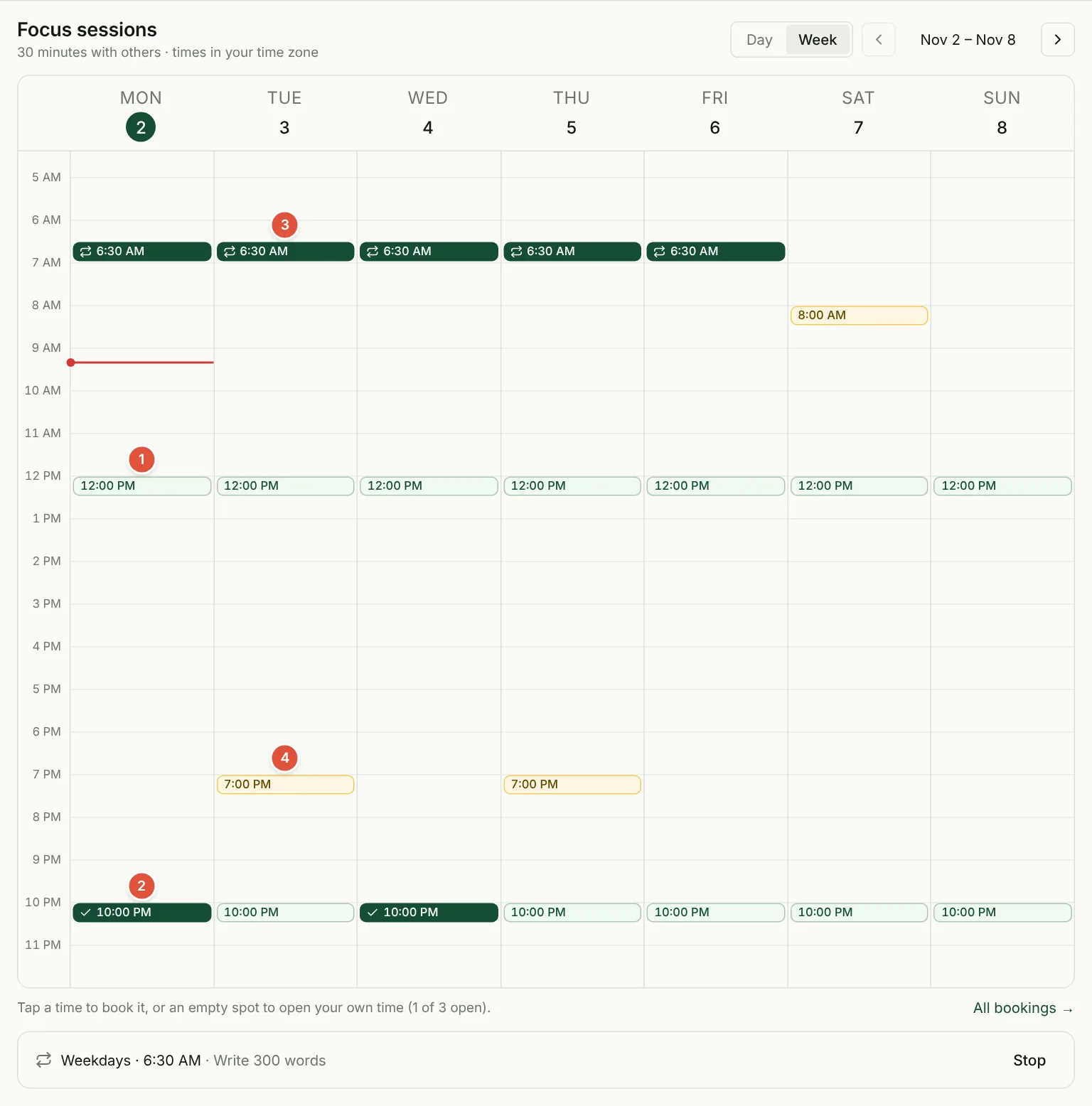
- Daily times (light green). Sessions run at a few fixed times every day. Fixed times matter: when a small number of people all book the same few slots, they actually meet.
- Your bookings (dark green). A check mark means you booked it once.
- Repeating bookings. The loop icon marks sessions that a weekly repeat booked for you (a Plus feature). The list under the calendar shows each repeat and lets you stop it.
- Times opened by members (gold). Plus members can open any half hour. Those times appear on everyone’s calendar, and anyone, free or Plus, can book them.
Tap a time to see who has booked it and to book it yourself. Your habits appear as chips, and the newest one is already filled in as your plan.
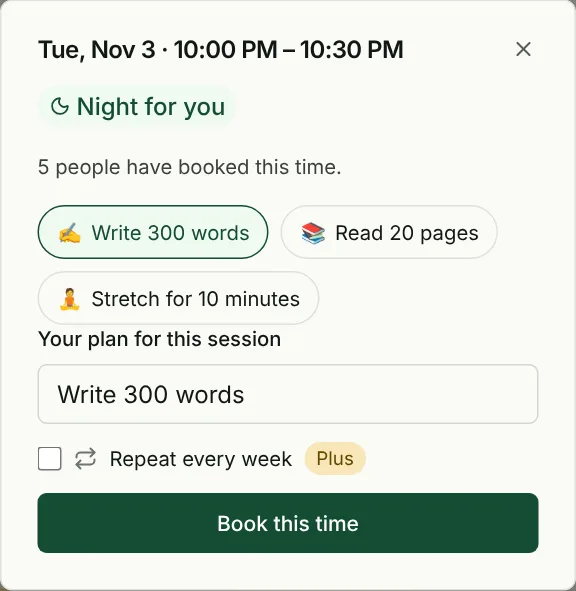
Once booked, the session page has an Add to calendar button that downloads a calendar event. Under All bookings you can also turn on an email confirmation and reminder for each booking.
If none of the daily times fit your day, that is exactly the problem Plus solves: you can open your own time, such as 6:30 before work, and others can join you there. See Free vs Plus for how to decide.
Step 3: Show up and enter the room
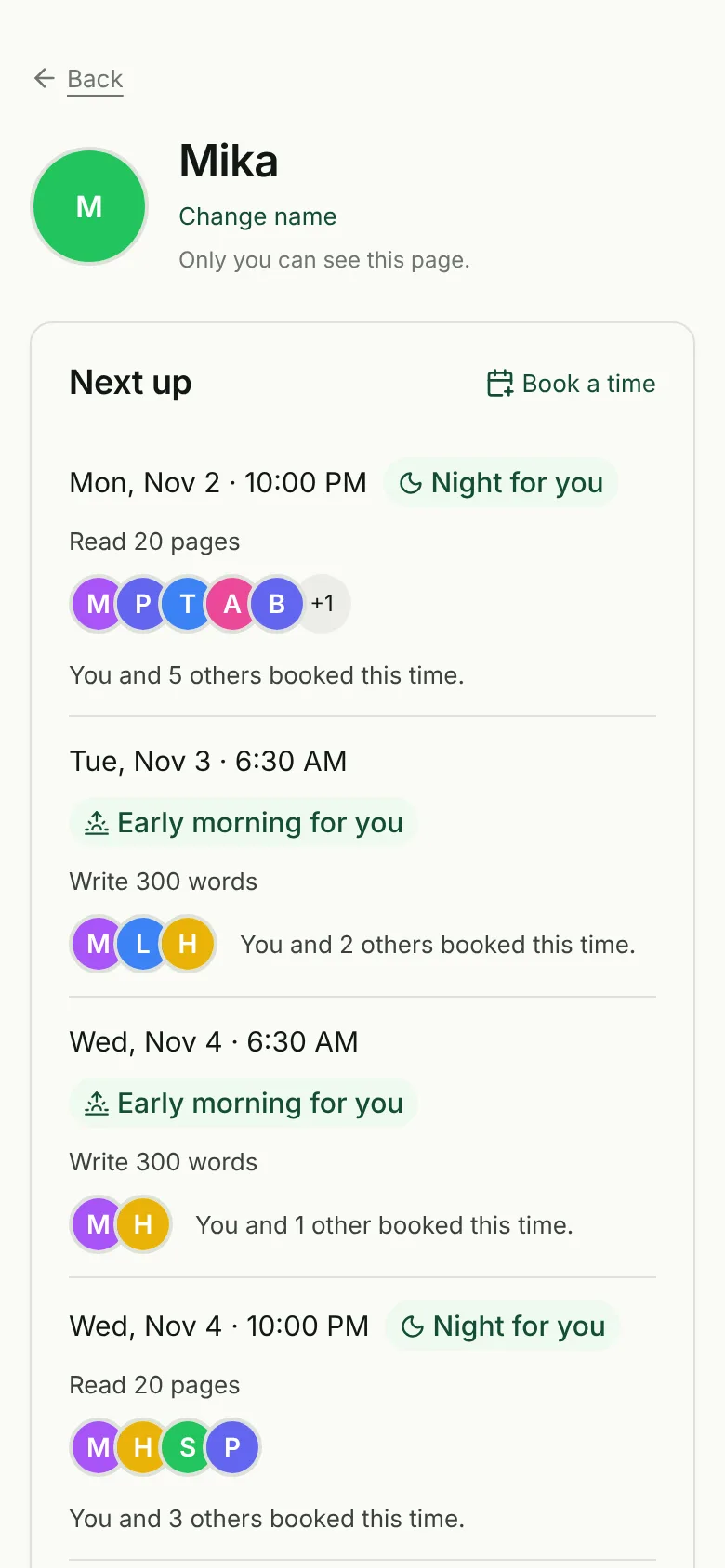
Each session time has its own page. Before the start it shows who booked and what each person plans to do.
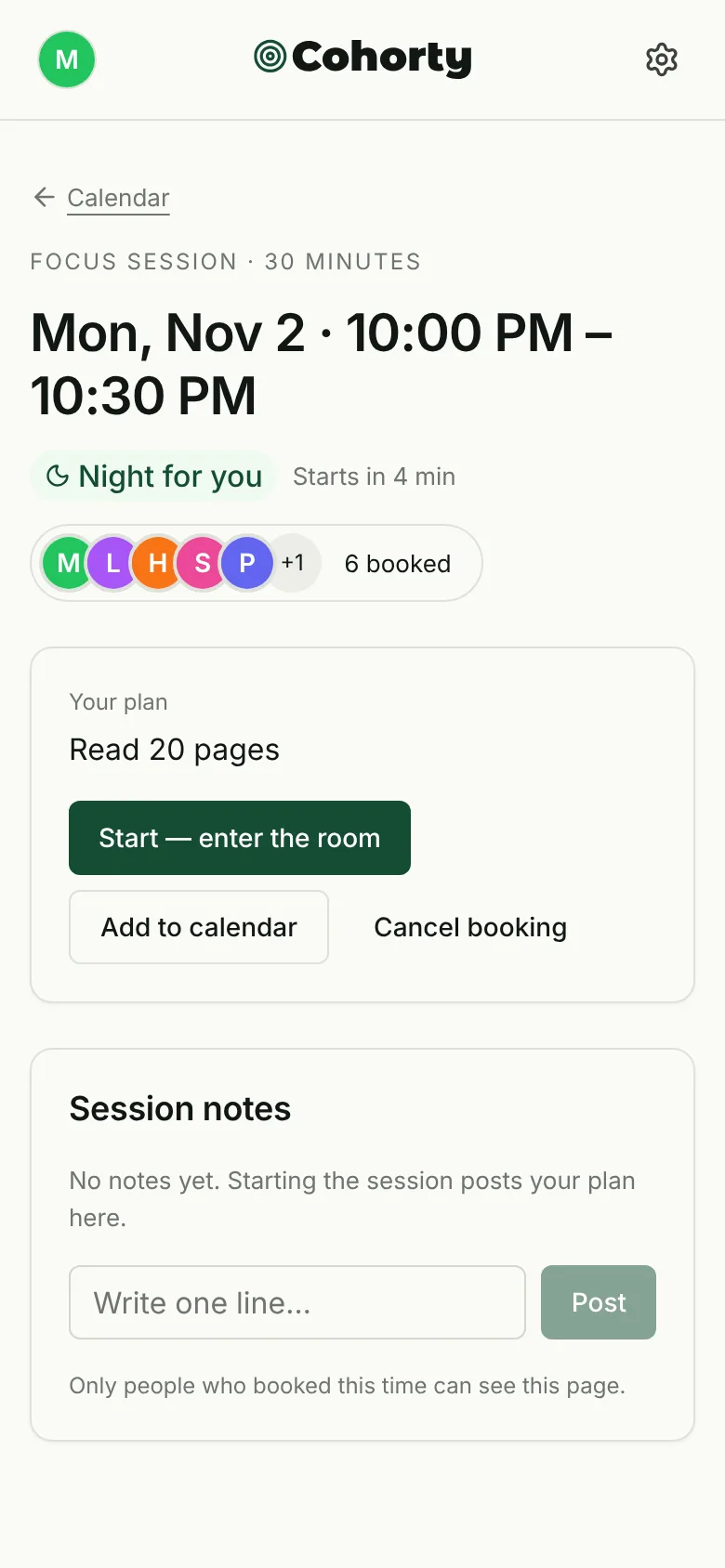
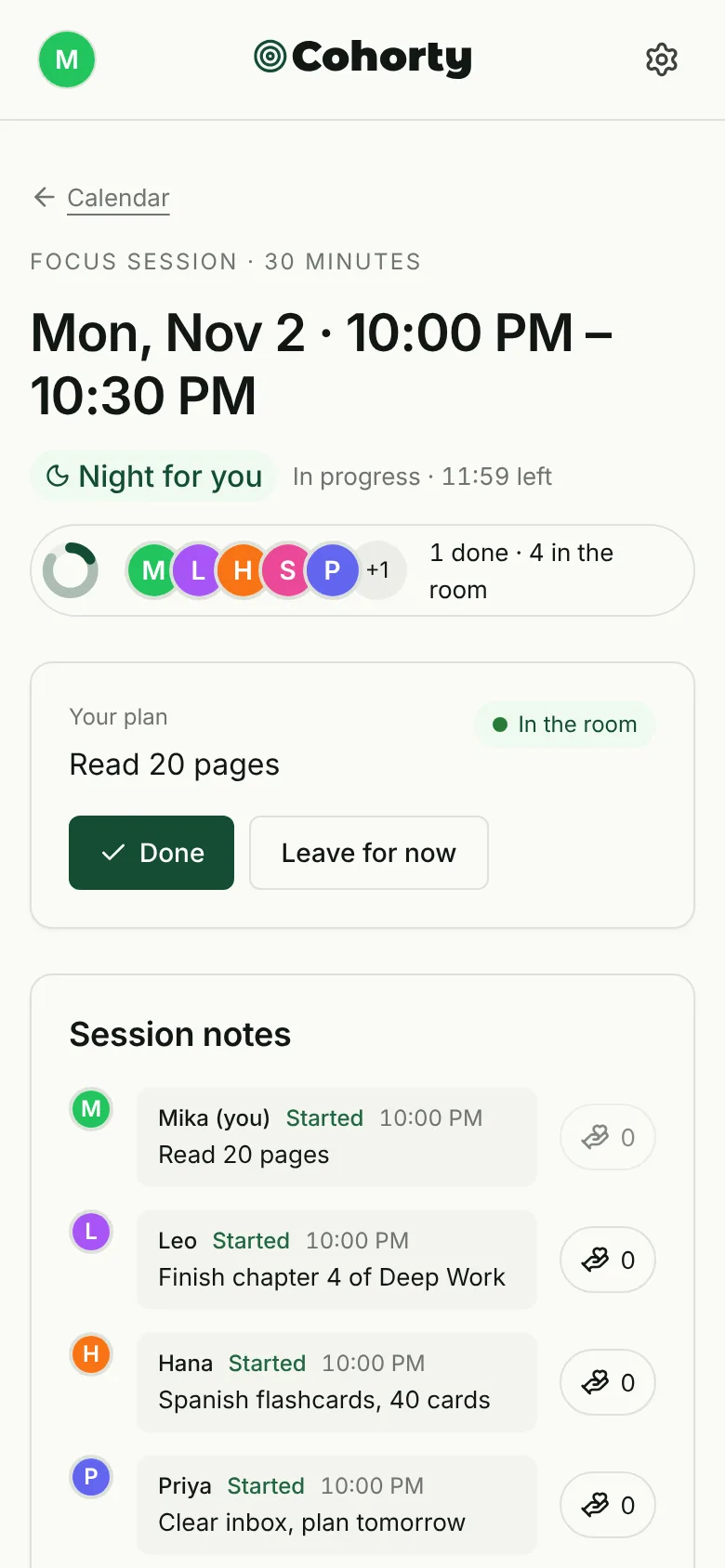
Entry opens 5 minutes before the start. Pressing Start, enter the room is your start: your plan is posted as the first line in the session notes, so everyone can see what you are working on. There is nothing to set up, no camera to turn on, and no one to talk to.
Then do the habit. The ring at the top fills in as people finish. You can write a one-line note if you want to (“Halfway, phone in the other room”), and you can applaud other people’s notes. That’s the whole social layer. How each part works, including stepping out and coming back, is covered in how Cohorty focus sessions work.
Step 4: Tap Done
When you finish, tap Done. It’s one tap: your plan becomes your finishing line, and the notes field invites an optional sentence about how it went.
If you entered but forgot to tap Done, the session page asks afterwards whether you finished, and you can mark it done for 12 hours after the end. After the session, the room is sorted into three groups: Finished, Showed up, and Didn’t make it. Showing up counts. On a hard day, entering the room and doing part of the plan is still a day you kept the appointment. If you have ADHD, our guide to ADHD-friendly focus sessions shows how to plan a day as a few small slots and what happens when you miss one.
Step 5: Book the next one
The fastest way to build the habit is to never leave a session without the next one booked. When a session ends, Same time tomorrow books the same time on the next day in one tap.
Doing the habit at the same time each day matters more than it sounds. A fixed time works as a cue, the same way an if-then plan does: “At 10 PM, I read.” If you want the time to book itself every week, that’s what repeating bookings in Plus are for.
Your page: next sessions and your rhythm
Your page is private. Only you can see it, and there is no public profile, follower count, or leaderboard.
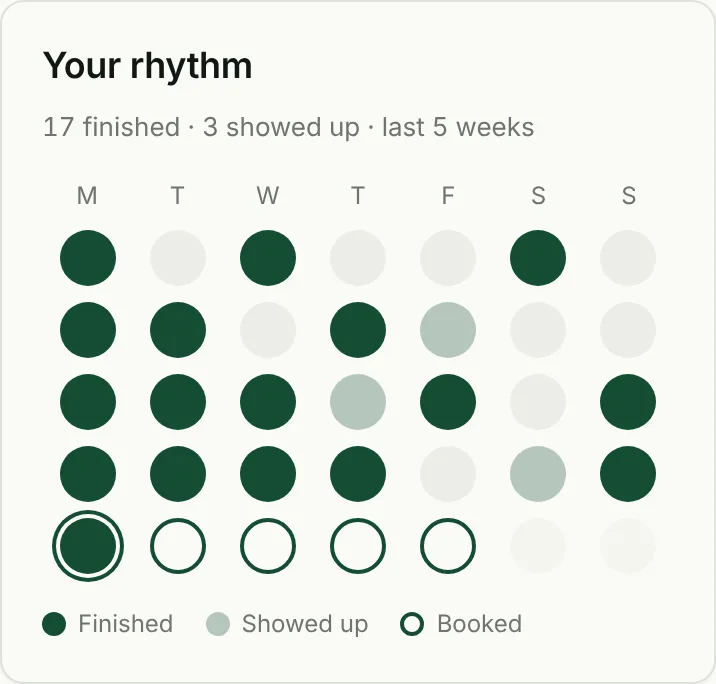
The rhythm grid shows one dot per day for the last five weeks:
- Dark dot: you finished a session that day.
- Light dot: you showed up but didn’t tap Done.
- Outlined dot: a session is booked.
- Grey: nothing that day.
There is no streak counter to break. A missed day is just a grey dot, and the next booked day is already waiting. If you have had a run of grey dots, our guide on what to do after you break a streak has a simple restart plan.
You can also rename a habit or change its emoji from this page, and change the name other people see in rooms.
Privacy: what other people see
- Your nickname, not your real name or email.
- Your plan and your notes for sessions you share with them.
- Whether you are in the room and whether you finished.
That’s it. A session’s page is visible only to the people who booked that time, and your page is visible only to you. You can block someone, and blocked pairs never share a room.
Common questions
Is Cohorty free?
Yes. Joining sessions at the daily times, joining times other people opened, notes, applause, Done, and your habits and private page are all free. Plus ($3/month) lets you open your own times and repeat bookings. See Free vs Plus.
Do I need a camera or microphone?
No. Cohorty has no video and no audio. You work in your own space and the room shows who is there, what they planned, and who has finished.
What if no one else books my time?
You can still start on your own; others may book later. The community is small, so some times are quieter than others. Booking one of the daily times gives you the best chance of company.
Can I use Cohorty for any habit?
Anything you can do in 30 minutes wherever you are: reading, writing, studying, practicing an instrument, a home workout, stretching, admin, or clearing your inbox.
Does it work on my phone?
Yes. Cohorty runs in the browser on phones and computers, and you can add it to your home screen.