
Study With Me Online: 5 Ways to Study Together, No Camera
How to study with other people online: study-with-me videos, live rooms, Discord servers, 1:1 sessions and camera-free booked sessions, and which one to pick.
“Study with me” means studying while other people study too: on a video, in a live room, or in a scheduled session. Nobody teaches you or checks your work. What helps is the company: when other people are working at the same moment, starting feels less optional and staying with the page feels a little easier.
You don’t need a camera for any of it. This guide compares five ways to study with others online, from free recorded videos to booked sessions, and explains which one fits which kind of procrastination.
Disclosure: Cohorty publishes this journal and is one of the options below. Other options are described in general terms; check each provider for current features and prices.
The five formats at a glance
| Format | Who’s there | Camera | Fixed start time | Cost |
|---|---|---|---|---|
| Study-with-me videos | A recorded or live streamer | None for you | No | Free |
| Live study rooms | Whoever is online | Usually optional | No | Usually free |
| Discord study servers | A community in voice or video channels | Optional | Some servers run timed sessions | Free |
| 1:1 video sessions (e.g. Focusmate) | One matched partner | On | Yes | Free tier, then paid |
| Booked camera-free sessions (e.g. Cohorty) | Everyone who booked the same time | None | Yes | Free to join |
The big difference is the last two columns. Formats without a start time are always available, which is great for “I’m studying now”. Formats with a start time give you an appointment, which is what helps on the days you’d otherwise never start.
1. Study-with-me videos
Search “study with me” plus a length (“2 hours”, “pomodoro 50/10”) on a video platform and you’ll find recorded and live sessions of someone studying, often with a timer, background sound and scheduled breaks.
Good for: zero setup, late nights, and people who find any real-time company stressful.
Watch out for: nobody expects you, so it’s easy to close the tab. The recommendations sidebar is one click away from a distraction. Put the video in a separate window, full screen, and decide the session length before you press play.
2. Live study rooms
Live study rooms are websites or apps where students work together in real time, often with optional cameras, timers and a visible count of who’s online.
Good for: feeling part of a crowd at any hour, including different time zones.
Watch out for: chat. Turn it off, or only open it during breaks. If the room shows other people’s cameras and that distracts you, hide the video grid.
3. Discord study servers
Many large Discord servers exist just for studying, with voice channels where people work quietly, “cam on” and “cam off” channels, and sometimes timed group sessions or study-hour leaderboards.
Good for: students who want an ongoing community and a place to ask the occasional question.
Watch out for: the server itself. Mute every channel except the one you study in, and don’t start your session by scrolling the announcements.
4. One-to-one video sessions
Services such as Focusmate match you with one other person for a scheduled session. You both say what you’ll work on, work with cameras on, and check in at the end.
Good for: strong accountability. A real person is waiting at a set time, and they can see whether you’re working.
Watch out for: the camera and the conversation. If being seen by a stranger is the reason you don’t book, this format won’t fix your procrastination. Our comparison of Focusmate alternatives covers other options, and Cohorty vs Focusmate compares it with a camera-free room.
5. Booked camera-free sessions
A middle ground: you book a time like a 1:1 session, but there’s no camera and no partner to match with. Everyone who booked the same time works in one shared room.
In Cohorty, for example, you book a 30-minute session, and entering the room posts what you plan to study. You can see what everyone else is working on, and you tap Done when you finish.
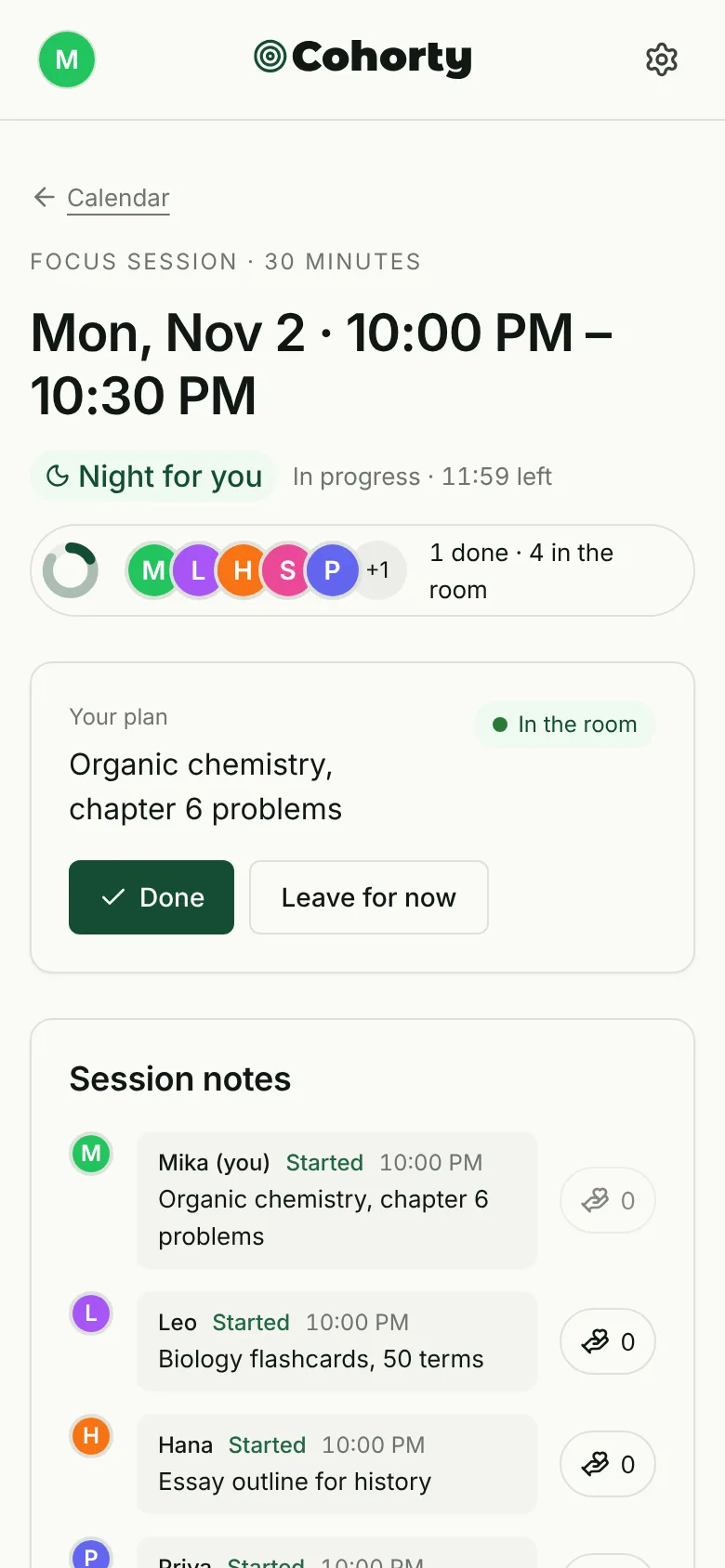
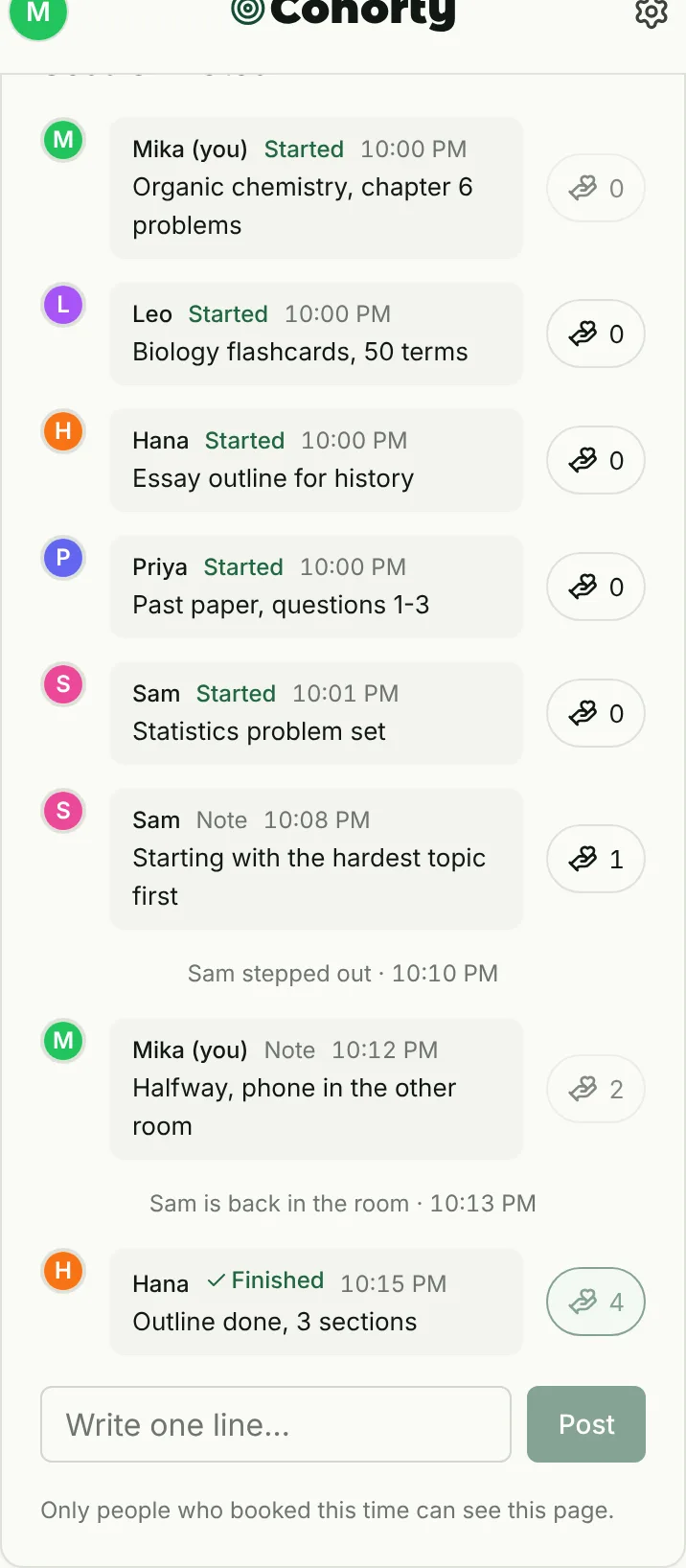
Good for: a fixed study time without being on camera. It works in a library, a dorm or on a phone.
Watch out for: sessions run at a few daily times unless you open your own with Plus, and the community is still small, so some sessions are quiet. You can still start on your own. Joining sessions is free; see how a session works.
Which one should you pick?
Start from what usually goes wrong for you:
| If you… | Try |
|---|---|
| Just want background company tonight | A study-with-me video or a live room |
| Want a community for a whole term | A Discord study server |
| Keep postponing until it’s too late | A format with a start time: 1:1 sessions or booked sessions |
| Avoid anything with a camera | Videos, or booked camera-free sessions |
| Need someone to actually notice | A 1:1 session, or a booked session where others see who finished |
Many students combine two: a booked session for the hard daily block, and a video or live room for extra review in the evening.
How to get the most out of studying with others
For when to study in a group and when alone, see group study vs studying alone.
Company helps you start; the method decides what sticks. Pair sessions with good study habits like active recall, and use a study schedule for exams when one is coming up.
- Write a specific plan before you start. “Statistics problem set 1–6” beats “study stats”. You’ll know when you’re done.
- Decide the length in advance. One 25- or 30-minute block is enough to start. The Pomodoro technique works well with every format here.
- Put the phone out of reach. Company helps you start; it doesn’t block notifications.
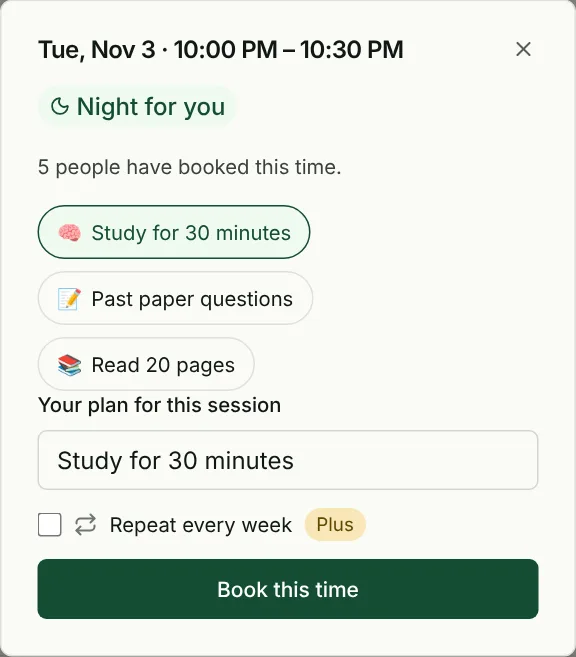
- Use the same time every day. A fixed time works as a cue, so you don’t have to decide each evening. In Cohorty, “Same time tomorrow” books the next day in one tap.
- Finish with one line. Note what you got through. Next time, you start from there.
Why studying alongside others can help
Research on social facilitation, summarized in Bond and Titus’s 1983 meta-analysis, found that the presence of others tends to speed up simple, well-practiced tasks, while it can slightly hinder complex, unfamiliar ones. In practice, that suggests using study-with-me company for getting started and for routine work like flashcards and problem sets, and protecting quiet time alone for the hardest new material.
You may also see precise claims about how much study rooms improve focus or grades. We haven’t found published studies behind those figures, so we don’t repeat them. For more on the idea, see our guide to virtual body doubling. If you have ADHD, how to study with ADHD covers short sessions, active recall and avoiding burnout.
Common questions
Is “study with me” the same as body doubling?
Mostly, yes. Body doubling means doing your own task while someone else is present. “Study with me” is the student version, from passive videos to live sessions.
Can I study with others online without a camera?
Yes. Videos and most live rooms don’t need yours, Discord camera use is optional, and some booked sessions, such as Cohorty’s, have no video at all.
Are study-with-me sessions free?
Videos, most live rooms and Discord servers are free. One-to-one services usually have a limited free tier. Joining Cohorty’s daily sessions is free.
How long should a study-with-me session be?
Start with 25 to 30 minutes. If that goes well, book or play a second block rather than committing to two hours up front.
Which format is best for exams?
Use a format with a start time for the daily block you can’t skip, and a video or live room for extra review. Our study buddy apps guide includes a two-week exam plan.