
7 Best Study Buddy Apps for Students (Free & Paid)
Compare 7 study buddy apps for students: virtual co-working, focus timers, and accountability features. Free and paid options for exam season.
A study buddy app gives you someone to study alongside online, so starting feels less optional and staying on task feels easier. The best options are Focusmate for one-to-one video sessions, Study Together on Discord for free drop-in rooms, Cohorty for camera-free sessions at fixed times, and Forest if you mainly need to keep your phone out of reach.
It’s 9 PM. You have an exam tomorrow. Your textbook is open, but so are Instagram, TikTok, and YouTube. Open a study room, and suddenly other students are working right now, timers running. Closing TikTok gets easier.
Studying tonight? Book a free 30-minute Cohorty session, write what you’ll study as your plan, and work alongside other people doing theirs. No camera, no chat, works on a phone in the library. See how a session works. (Cohorty publishes this journal.)
Looking specifically for “study with me” sessions, from videos to live rooms? See 5 ways to study with others online.
In this guide:
- The 7 best study buddy apps, by format and price
- Which apps suit introverts, night owls, and tight budgets
- Free vs. paid: what is worth paying for
- How to use them without getting distracted
Why Study Buddy Apps Actually Work
Before diving into the apps, let’s understand the psychology.
Why studying alongside others can help
You may have seen precise figures for how much study rooms improve focus or grades. We couldn’t find a published study behind them, so we don’t repeat them here. What is well established is the mechanism: people often work differently when others are present, an effect psychologists call social facilitation. Students who use study rooms mostly describe the same three things:
1. Social facilitation effect
- We perform better when others are watching (even virtually)
- Knowing someone can see you studying activates your “performance mode”
- You’re less likely to scroll Instagram when 50 people can see your screen
2. Accountability without pressure
- Unlike study groups where you need to “contribute,” virtual study buddies just… exist
- Their presence is enough
- No obligation to talk, just parallel focus
3. Competitive motivation
- You see someone on their 3rd Pomodoro
- Your brain thinks: “If they can do 3, I can do 3”
- Friendly competition without explicit comparison
Key insight: You don’t need to interact with study buddies to benefit. Just knowing they’re there changes your behavior.
Learn more about how accountability partners work →
What to Look for in a Study Buddy App
Before choosing an app, consider:
1. Video vs. No Video
Video on (camera required):
- Pros: Maximum accountability, harder to cheat
- Cons: Self-conscious, requires camera/good lighting, drains battery
- Best for: People who need strong external pressure
Video optional or audio-only:
- Pros: Less pressure, better for introverts, conserves battery
- Cons: Easier to zone out
- Best for: People who want gentle accountability
No video (just presence/timers):
- Pros: Most flexible, works anywhere, no appearance concerns
- Cons: Least accountability
- Best for: Experienced self-studiers who just need a nudge
2. Group Size
Small rooms (2-8 people):
- More personal
- You notice if someone stops working
- Higher accountability
Large rooms (50-500+ people):
- Anonymous
- No social pressure
- Good for people who dislike attention
Sweet spot for most: 8-15 people (enough presence, not overwhelming)
3. Features That Matter
Must-haves:
- ✅ Pomodoro timer (25 min work, 5 min break)
- ✅ Ability to set study goals
- ✅ Quick join (don’t need to schedule sessions)
Nice-to-haves:
- 📊 Study time tracking
- 🎵 Background music/ambience
- 💬 Chat (for quick questions)
- 🏆 Leaderboards/streaks
Avoid:
- ❌ Mandatory video calls with conversation (you’ll spend more time talking than studying)
- ❌ Complex social features (becomes a distraction itself)
- ❌ Invasive screen monitoring (creepy and trust-breaking)
The 7 Best Study Buddy Apps
Want more options, including camera-free ones and other accountability apps? See our comparison of Focusmate alternatives.
1. Focusmate
Type: Video-on, 1:1 or small group sessions Cost: Free (3 sessions/week); Plus $8/month billed annually or $12/month billed monthly Best for: People who need strong accountability
How It Works
- Book a 25 or 50-minute session
- Get matched with another person (or join a small group)
- Both cameras on, microphones muted
- Quick intro (30 seconds: “I’m studying biology”)
- Work silently, sign off at the end
Pros
- ✅ Extremely effective (camera-on = max accountability)
- ✅ Global community (always someone available)
- ✅ Professional vibe (people actually work)
- ✅ Chrome extension (easy to use)
- ✅ Works for any task (study, work, writing)
Cons
- ❌ Requires camera (not for everyone)
- ❌ Need to schedule sessions (can’t just drop in)
- ❌ Limited free plan (only 3 sessions/week)
- ❌ 1:1 can feel intense for introverts
Best for: Serious students who need maximum accountability
2. Study Together (Discord Server)
 A Discord server with voice and video study rooms
Type: Video optional, large community rooms Cost: Free Best for: Students who want flexible drop-in study sessions
How It Works
- Join the Discord server (100k+ members)
- Hop into a voice/video study room
- Cameras optional (most people audio-only)
- Set your status (“Studying Chemistry - 2 hours”)
- Leave when done
Pros
- ✅ Completely free
- ✅ Always active (24/7 global community)
- ✅ Flexible (drop in/out anytime)
- ✅ Multiple rooms (quiet study, music, exam prep)
- ✅ Chat available (but optional)
- ✅ Accountability bot (tracks your study time)
Cons
- ❌ Discord learning curve (if you’re new)
- ❌ Can be distracting (chat temptation)
- ❌ Less structured than scheduled apps
- ❌ Video optional = less accountability for some
Best for: Students who want free, flexible, low-pressure accountability
How to join: Search “Study Together Discord” on Google
3. Forest
Type: Gamified timer with virtual “tree planting” Cost: $3.99 one-time (mobile), Free (browser extension) Best for: Students who respond to gamification
How It Works
- Set a study timer (25 min - 2 hours)
- Plant a virtual tree
- If you leave the app (to check social media), your tree dies
- Collect trees to build a forest
- Partner with real tree-planting organizations (plant real trees with coins)
Pros
- ✅ Gamification that actually works
- ✅ Visual progress (your forest grows)
- ✅ Blocks distracting apps during study
- ✅ Friends can join “group study rooms” (plant trees together)
- ✅ Real-world impact (actual trees planted)
Cons
- ❌ No video/human accountability (you vs. the app)
- ❌ Costs money (though one-time payment)
- ❌ Can become about “the game” instead of studying
- ❌ Less social connection than other apps
Best for: Self-motivated students who like gamification and don’t need human interaction
4. Caveday
Type: Guide-led group focus sessions on Zoom Cost: Starter Pass $105 per 3 months, after a 14-day free trial Best for: Students who want structured, guided sessions
How It Works
- Reserve a session of 30 minutes, 1 hour, or 3 hours (offered every day)
- A human guide welcomes the group and asks everyone to silence distractions
- Share your focus for the session with a small group
- Work in sprints with short breaks; everyone is muted, cameras encouraged
- Close by sharing a win
Pros
- ✅ A guide keeps the session on track (like a virtual study hall)
- ✅ Structure removes decision fatigue
- ✅ Long 3-hour blocks for exam prep and theses
- ✅ Weekly planning workshops
Cons
- ❌ Paid membership after the trial
- ❌ Sessions close 10 minutes after the start
- ❌ Camera encouraged
Best for: Graduate students or anyone who wants guided, long focus blocks
5. StudyStream
Type: Always-open live focus rooms (app and Discord) Cost: Free access; check the app for paid features Best for: Students who want company at any hour
How It Works
- Join a live focus room whenever you sit down to study
- See other students working around the world, around the clock
- Use built-in timers and session tracking
Pros
- ✅ No scheduling: drop in any time
- ✅ Large global community
- ✅ Camera optional
Cons
- ❌ No fixed start time, so it helps you stay more than start
- ❌ Less personal than a 1:1 session
Best for: Night-owl studiers and students in any time zone
6. Structured (App)
Type: AI-powered study planner + accountability Cost: Free; paid Pro tier Best for: Students who need help planning study time (not just accountability)
How It Works
- Input your classes, assignments, exams
- AI creates a study schedule
- Get daily study plan
- Check off tasks as you complete them
- Join optional “study now” rooms with others
Pros
- ✅ Automated planning (removes decision fatigue)
- ✅ Syncs with school calendar
- ✅ Reminders and notifications
- ✅ Optional social accountability
- ✅ Works for busy schedules
Cons
- ❌ AI planning can feel rigid
- ❌ Premium required for best features
- ❌ Less focus on real-time accountability
- ❌ Better as a planner than study buddy app
Best for: Disorganized students who need help planning when to study
7. Cohorty Study Sessions
 Camera-free study sessions at a set time
Disclosure: Cohorty publishes this journal, so we have a commercial interest in it.
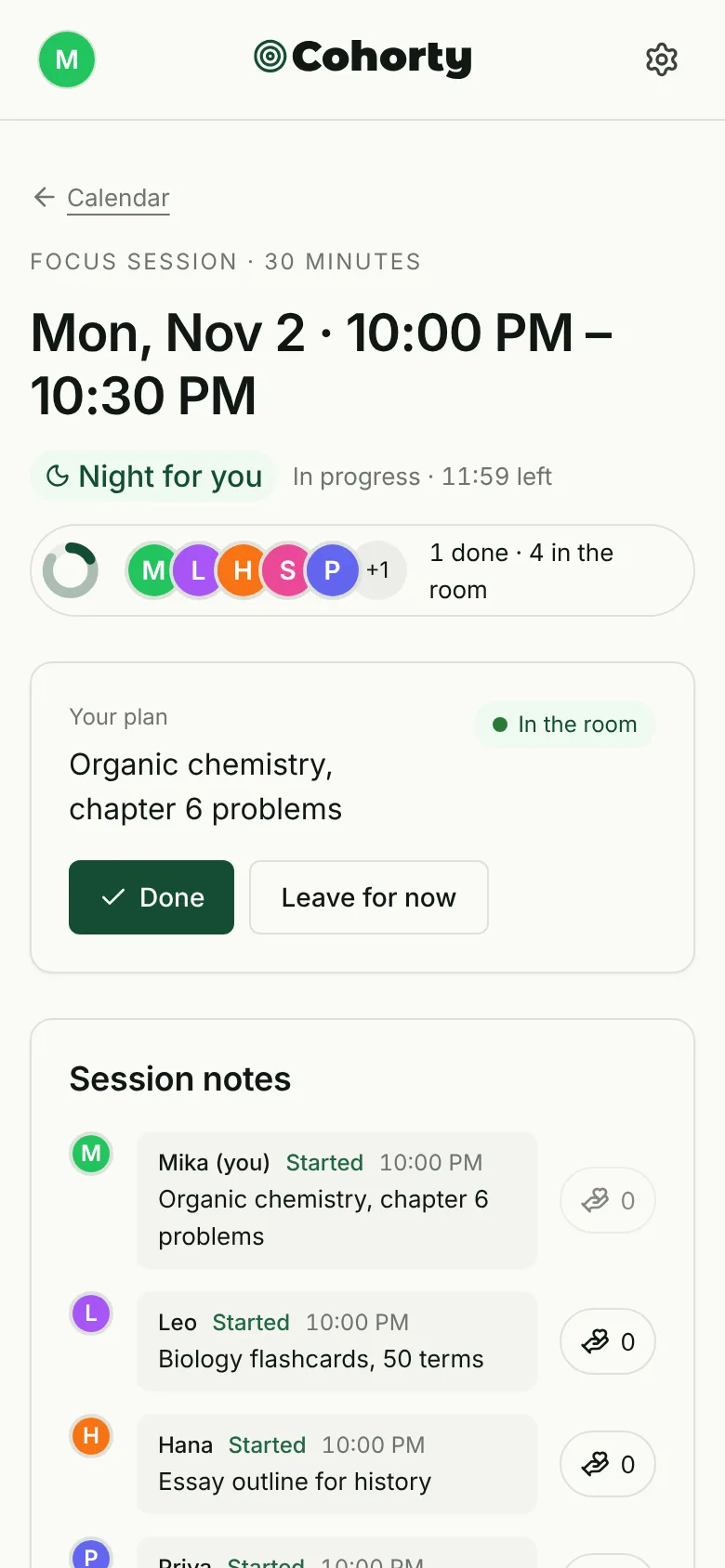
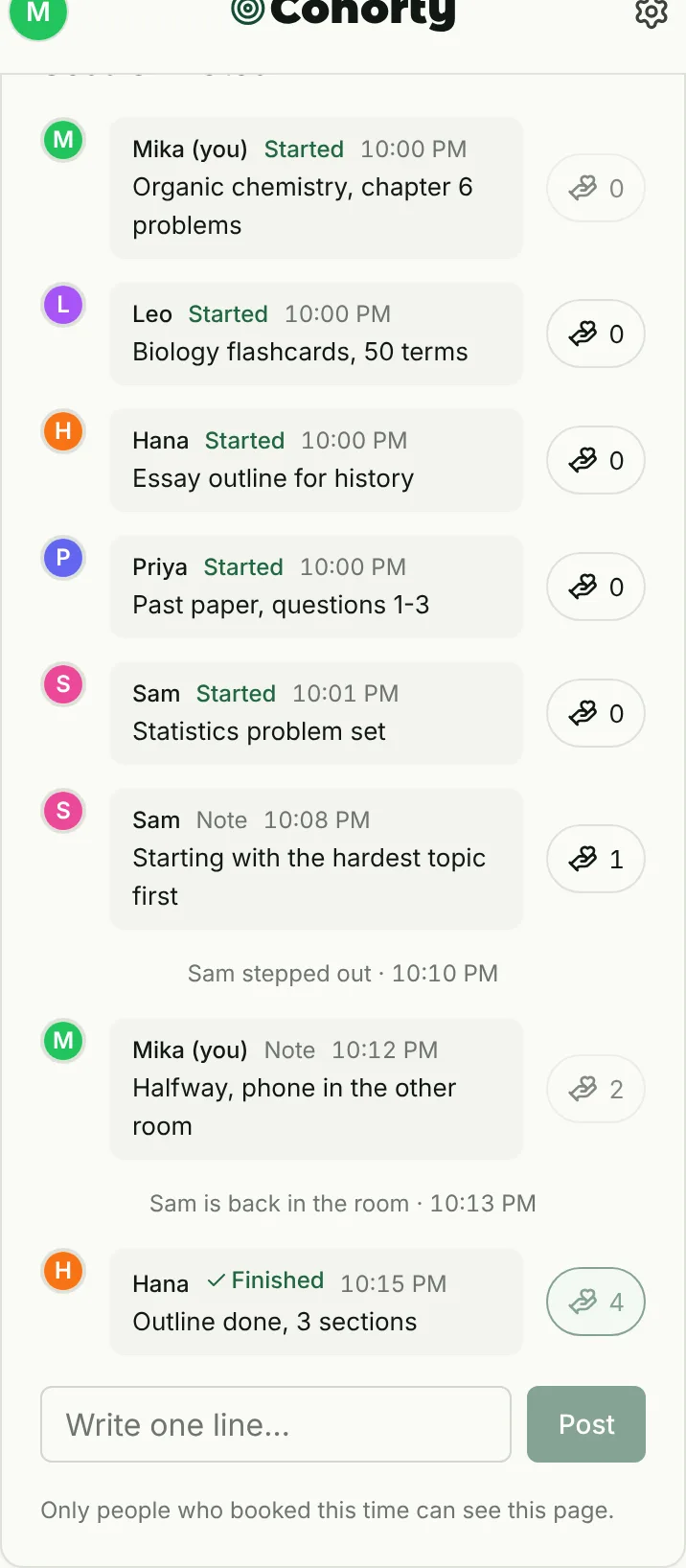
What it is: You book a 30-minute session at one of a few fixed times each day and study alongside everyone who booked the same time, in one shared room. Entering the room posts what you plan to study; when you finish, you tap Done. No video, no chat; everyone uses a nickname.
Why it fits students:
- A fixed study time with other people working at the same moment
- No camera, so it works in a library, a dorm, or on a phone
- Free to join sessions
Limitations:
- Sessions run at a few set times each day unless you open your own with Plus
- The community is still small, so some times have few people (you can still start on your own)
- Sessions are always 30 minutes, so longer blocks mean booking back-to-back times
- Runs in the browser on desktop and phone
Pricing: Joining sessions is free. Plus is $3/month and lets you open your own times at any half hour and repeat bookings on the days you choose.
Best for: Students who need a start time and quiet company, without a video call. More detail: how to use Cohorty.
Comparison Table: Quick Reference
| App | Free/Paid | Cost | Video Required | Best Feature | Best For |
|---|---|---|---|---|---|
| Focusmate | Freemium | Free (3/week); Plus $8/mo billed annually or $12/mo | ✅ Yes | 1:1 max accountability | Serious students |
| Study Together | Free | 100% Free | ❌ Optional | 24/7 flexible drop-in | Budget students |
| Forest | Paid | $3.99 one-time | ❌ No | Gamification + app blocking | Self-motivated |
| Caveday | Paid | $105 per 3 months (14-day trial) | Encouraged | Guide-led sessions | Graduate students |
| StudyStream | Free | Free access; paid features vary | ❌ Optional | 24/7 live rooms | Any time zone |
| Structured | Freemium | Free; paid Pro tier | ❌ No | AI study planning | Disorganized students |
| Cohorty | Free | Free to join sessions; Plus $3/mo | ❌ No camera | Fixed-time sessions, no chat | Daily study habit |
💡 Quick Picks by Budget
Best Free Options (No Payment Required):
- Study Together Discord - Most features, 24/7 active
- Cohorty - Best for habit building
- StudyStream - Always-open rooms
Best Value Paid Options:
- Forest - $3.99 one-time (best value!)
- Focusmate - Plus from $8/month billed annually (max accountability)
- Structured - Pro tier (if you need planning)
Free vs. Paid: What’s Actually Worth Paying For?
The honest truth: You can build excellent study habits using only free apps.
But here’s when paying makes sense:
When Free Apps Are Enough
You should stick with free options if:
- ✅ You’re on a tight student budget
- ✅ You’re just starting with study buddy apps (test free first)
- ✅ You prefer flexible, drop-in sessions (Study Together Discord is perfect)
- ✅ You want long-term habit building (Cohorty is free)
- ✅ Video accountability isn’t essential for you
Best free combo:
- Daily focus: Study Together Discord
- Daily study habit: Cohorty sessions at a fixed time
- Occasional help: StudyStream for subject-specific questions
Cost: $0/month Effectiveness: 8/10 (genuinely works for most students)
When Paid Apps Are Worth It
Consider paying if:
- ✅ You need maximum accountability (camera-on 1:1)
- ✅ Free options haven’t worked (you need structure)
- ✅ You’re struggling academically (grades justify investment)
- ✅ App blocking is critical (Forest prevents phone distractions)
- ✅ You’re a graduate student (higher stakes, worth the cost)
Best paid combo:
- Max focus: Focusmate (Plus from $8/mo) - 1:1 camera accountability
- App blocking: Forest ($3.99 one-time) - Prevents distractions
- Planning: Structured (free; Pro tier) - If you’re disorganized
Cost: $13.99/month (or $8.99 if you skip Structured) Effectiveness: 9.5/10 (for students who actually need strong external accountability)
The Smart Strategy: Start Free, Upgrade If Needed
Week 1-2: Try Study Together Discord + Cohorty (both free)
- Track your study hours
- Note your productivity
Week 3: Still struggling? Add Focusmate free trial (3 sessions/week)
- If those 3 sessions dramatically improve focus → consider Plus
- If not → stick with free options
One-time investment: Get Forest ($3.99) if phone distraction is your #1 enemy
- Pays for itself if it saves you from one failed exam
Is a Paid Plan Worth It?
Pay only when a free limit actually stops you. Focusmate’s free plan covers three sessions a week; if you use all three and want more during exam season, Plus (from $8/month billed annually) may be worth it. Otherwise, free drop-in rooms and free session apps cover most students.
How to Use Study Buddy Apps Effectively
An app gets you started; good methods make the time count. See note-taking methods and study habits that last.
Mistake most students make: They open the app, study for 15 minutes, then get distracted by chat features or close the app entirely.
Here’s how to actually benefit:
Strategy 1: Stack Multiple Apps
Don’t rely on just one.
Example combo:
- Planning: Structured (plan your week)
- Single sessions: Focusmate (when you need max focus)
- Flexible study: Study Together Discord (drop in anytime)
- Habit building: Cohorty (book the same study session every day)
Why this works: Different apps serve different needs. Use the right tool for the right job.
Strategy 2: Set Clear Intentions
Before opening the app:
- What are you studying? (Be specific: “Chapter 5 Biology,” not “Bio stuff”)
- How long? (Use Pomodoro: 25 min blocks)
- What’s the goal? (“Finish 20 practice problems”)
Why it matters: Vague intentions = vague results. Specific goals = focused work.
Strategy 3: Turn Off Chat (Unless You Need It)
The trap: Study buddy app becomes social hangout.
The fix:
- Mute chat notifications
- Only check chat during breaks
- Join “silent study” rooms when available
Exception: If you’re stuck on a problem, chat can be helpful. But set boundaries.
Strategy 4: Use the “One More Block” Rule
When you want to quit:
- Tell yourself: “One more Pomodoro (25 min)”
- Usually, once you finish that block, you’ll keep going
- If you still want to quit after, that’s fine
Why it works: Starting is the hardest part. Momentum carries you.
Strategy 5: Celebrate Streaks
Track your study days:
- “Studied 7 days in a row”
- “Completed 20 Focusmate sessions this month”
Why it matters: Streaks create psychological investment. You won’t want to break a 15-day streak.
Learn why streaks matter in habit formation →
A Two-Week Exam Plan With a Study Buddy App
Before choosing an app, decide what you need others for; see group study vs studying alone.
The apps work best when the time is decided in advance. A simple plan for the two weeks before an exam:
| When | What to do | Tool that fits |
|---|---|---|
| Day 1 | List every topic and rank by confidence | Paper or Structured |
| Days 2–10 | One fixed session a day, hardest topic first | A booked session (Cohorty, Focusmate) |
| Evenings, if needed | One extra block for review | A drop-in room (Study Together, StudyStream) |
| Days 11–13 | Past papers under timed conditions | Any quiet room; phone in another room or Forest |
| Day 14 | Light review and sleep | None |
Make the daily session automatic. Book the same time every day so you don’t have to decide each evening. On Cohorty, “Same time tomorrow” books the next day in one tap after each session, and Plus can repeat a booking on the days you choose.
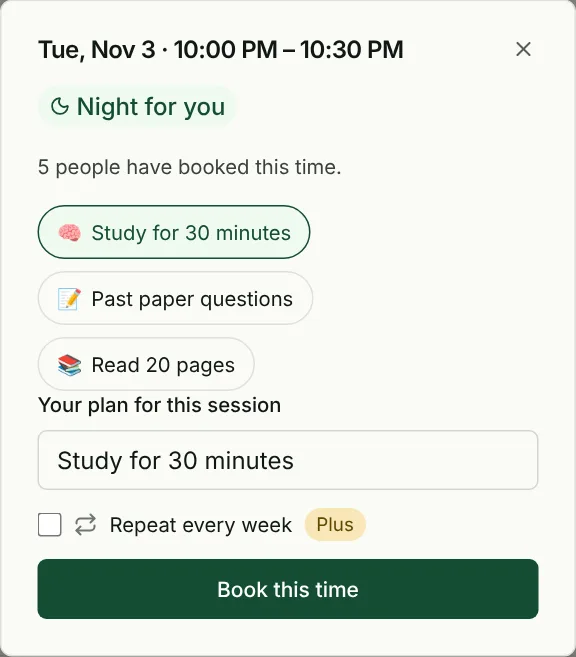
Write a specific plan. “Statistics problem set 1–6” beats “study stats”. You’ll know when you’re done, and you’ll know what to do when you sit down.
Common Questions from Students
Will I look weird on camera?
Reality: Everyone feels self-conscious at first.
What actually happens:
- Nobody cares what you look like (they’re focused on their work)
- Most people turn off backgrounds or angle camera away from face
- After 2-3 sessions, you forget the camera exists
Pro tip: Position camera so it shows your desk/hands working, not a close-up of your face.
What if I need to take a break?
All apps allow breaks.
Standard protocol:
- Pomodoro method: 25 min work, 5 min break (built-in)
- Signal you’re on break (turn off camera or update status)
- Come back when ready
Nobody judges you for taking breaks. Breaks are part of productivity.
Can I study with friends?
Most apps support this:
- Focusmate: Book sessions together
- Study Together Discord: Create private rooms
- Cohorty: Book the same session time; each of you sees who else booked
Benefits: Familiarity + accountability.
Risks: Friends can distract each other. Set ground rules (“No chatting during study blocks”).
What if my internet is bad?
Options:
- Use audio-only modes (uses less bandwidth)
- Try “presence” apps like Forest (no video/audio needed)
- Download materials beforehand, study offline, check in after
Don’t let bad internet stop you. Adapt.
Are these apps creepy? Is someone watching me?
Legitimate concern.
Reality:
- No screen monitoring: These apps don’t see what’s on your screen
- No recordings: Sessions aren’t saved (Focusmate policy)
- You control camera: Angle it how you want, turn off if needed (some apps)
If it feels invasive, choose apps without video requirement.
Study Buddy Apps for Different Student Types
For Students With ADHD
Short scheduled sessions with other people studying at the same time tend to help most. Our guide to studying with ADHD has a sample exam-prep week.
For Introverts
Best choices:
- Forest (no human interaction)
- Cohorty (booked sessions, no video or chat)
- Study Together Discord (video optional, can lurk)
Avoid: Focusmate 1:1 (too intense), Caveday (facilitator check-ins)
For Extroverts
Best choices:
- Study Together Discord (social chat available)
- Focusmate (human connection)
- Caveday (facilitator interaction)
Avoid: Forest (too solitary)
For Easily Distracted Students
Best choices:
- Focusmate (max accountability)
- Forest (blocks apps)
- Caveday (facilitator keeps you on track)
Avoid: Study Together (chat can distract), apps without structure
For Self-Motivated Students
Best choices:
- Forest (gamification, independence)
- Structured (planning focus)
- Study Together (flexible)
Avoid: Overly structured apps (you don’t need hand-holding)
For Budget-Conscious Students
Best free options:
- Study Together Discord (100% free)
- Cohorty (free camera-free sessions)
- StudyStream (free peer rooms)
One-time payment: Forest ($4)
Avoid: Caveday ($25/mo), Focusmate Plus unless necessary
Frequently Asked Questions
Do these apps actually improve grades?
Not directly. No large study shows that a study buddy app raises grades. What they can do is get you to start and keep you studying for the time you planned, and time spent on effective study methods is linked to better results.
However: The app is a tool. You still need to study effectively, not just log hours.
Which app is best for exam prep?
Short-term intense focus: Focusmate or Caveday (scheduled, structured)
All-nighters (not recommended but…): Study Together Discord (always active)
Pre-exam habit building: Cohorty (a daily session booked through exam period)
During exam itself: None (focus on the exam!)
Can I use these for group projects?
Yes, but awkwardly.
Better options for group work:
- Regular Zoom/Google Meet (these apps are for individual focus)
- Discord voice channels (if you need to discuss)
Use study buddy apps for individual work on the group project.
Are these apps safe for minors?
Most apps are 13+ or 18+.
Safety features to look for:
- Reporting/blocking tools
- Moderation (especially in Discord servers)
- No private messaging with strangers
Parents: Preview the app first. Study Together Discord has active moderation. Focusmate matches are brief and task-focused.
What about time zone differences?
Global apps solve this:
- Study Together: 24/7 active (always someone online)
- Focusmate: Worldwide users, book sessions anytime
- Forest: No coordination needed (solo focus)
Time zones aren’t a problem for most apps.
Your Next Steps
Step 1: Identify Your Need
Ask yourself:
- Do I need single session accountability or long-term habit building?
- Am I comfortable on camera?
- What’s my budget?
- Am I introverted or extroverted?
Match your answer to the apps above.
Step 2: Try 2-3 Apps This Week
Don’t overthink it.
Suggested trial:
- Monday: Try Study Together Discord (free, easy)
- Wednesday: Try Focusmate (3 free sessions/week)
- Friday: Try Forest if you liked studying solo, or Cohorty if you want habit focus
After 3 trials, you’ll know what works for you.
Step 3: Commit to One for 30 Days
Once you find your favorite:
- Use it daily (or 5x/week minimum)
- Track your study hours
- Compare to your pre-app baseline
After 30 days, evaluate: Did it help? Keep using it. Didn’t help? Try another.
Step 4: Stack Apps (Optional)
Advanced strategy:
- Daily focus: Focusmate or Study Together
- Daily study time: Cohorty sessions
- Planning: Structured
Use the right tool for each need.
Final Thoughts
The hardest part of studying isn’t understanding the material—it’s sitting down and starting.
Study buddy apps solve the “sitting down” problem. Once you’re in a session, momentum carries you.
You don’t need willpower. You need systems.
A study buddy app is a system.
When you see 200 people studying at midnight, you think: “If they can do it, I can do it.”
When someone’s on their 3rd Pomodoro, you think: “I should do another block too.”
When your camera is on, you think: “I can’t check Instagram right now.”
That’s not willpower. That’s social accountability at work.
The best part? Most of these apps are free. You don’t need to spend money to access the same accountability that helped thousands of students go from barely passing to thriving.
Try one today. Not tomorrow. Today.
Your grades will thank you.
Ready to build a consistent study habit? Book a free Cohorty session and study at the same time as other people. No camera, no chat.
Or learn more about how group accountability works → to understand why studying with others is so effective.
Stop studying alone. Find your study buddies today.